MQTT Subscribe (Trigger)
MQTT-Subscribe is the MQTT trigger used to monitor configured topics. When MQTT messages are received, it triggers the subsequent transfer. The received message content is then available to the flow for further processing.
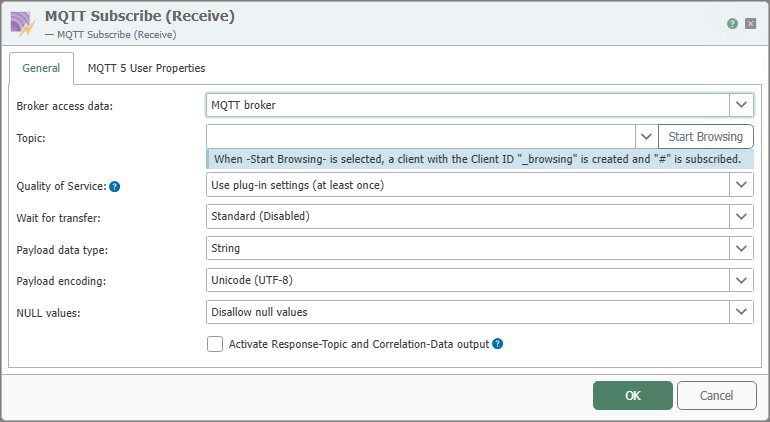
In the properties dialog, you specify which broker connection is used for the subscription and how received messages are interpreted:
The same topic can be monitored in multiple flows. Each of these flows is triggered exactly once per incoming message; this is the intended behavior and does not result in a double trigger.
If these three conditions are met simultaneously, no transfer is triggered:
- Multiple flows monitor the same topic via the same broker connection.
- For at least one of these triggers, “Wait for transfer” is enabled, even if the value is taken from the plug-in settings.
- The message arrives with a Service Quality above 0.
This is not an edge case: As soon as all three conditions are met, this applies to every message on this topic, regardless of the broker used. All involved triggers switch to the “Configuration Error” state and report the affected topic.
Resolve one of the three conditions: Disable “Wait for transfer” for all triggers of this topic, monitor the topic in only one flow, or set the service quality to 0. A single waiting trigger is sufficient to trigger the error state for all of them.
Then activate the modified engineering; only then will the triggers exit the error state. Messages that were received during this time will not be retried.
A flow is only triggered multiple times if the same message reaches it multiple times. The fact that multiple flows monitor the same topic is not sufficient for this to occur. The cause is always multiple deliveries:
- Overlapping subscriptions. A flow on
anlage/#and a second one onanlage/1/tempare registered with the broker as two separate subscriptions; the OPC Router does not merge overlapping patterns. Whether the broker delivers a matching message once or once per matching subscription is left open by the MQTT specification, in both MQTT 3.1.1 and MQTT 5. This therefore depends on the broker used and must be verified before deployment. - Multiple broker connections to the same broker that subscribe to the same topic: Each connection receives the message, and every associated flow is triggered.
- Active MQTT data storage. Their topic patterns are also subscribed to. Since the pattern
#is set by default, it overlaps with every trigger topic; in this case, the first point applies. Limit the patterns to the topics that are actually needed.
If the broker connection uses MQTT 5 and the broker includes the subscription ID, the OPC Router assigns each delivery to its subscription; a flow is then triggered only once, even if patterns overlap. With MQTT 3.1.1, this mapping is missing, and when MQTT data storage is enabled, it is not evaluated.
Message deduplication in the broker connection helps prevent multiple deliveries. Note its two limitations: It applies per broker connection and therefore does not help with the second issue, and since the content is included in the comparison, it also discards genuine duplicates with identical content. For this reason, it is disabled by default.
Regardless of this, a broker with Service Quality 1 may deliver the same message repeatedly. Flows triggered by such events must be able to handle multiple executions; where this is not possible, use Service Quality 2.
The individual properties are:
| Property | Description |
|---|---|
| Broker Connection | Select the configured MQTT broker connection through which the topic is to be subscribed to. |
| Topic | Name of the topic to be monitored. Depending on the broker, topic patterns with wildcards can also be used. Clicking Start Browsing also allows you to initiate a topic selection based on the current broker connection. |
| Quality of Service | Sets the Quality of Service value for the subscription. 0 processes messages without additional acknowledgment, 1 with a simple acknowledgment, and 2 with full delivery assurance. Selecting Use Plug-in Setting applies the default value stored in the MQTT plug-in. |
| Wait for Transfer | Specifies whether the trigger waits for the subsequent transfer to complete before the message is considered processed internally. |
| Payload Data Type | Determines whether the received payload is passed to the flow as a byte array or as a string. |
| Payload Encoding | Specifies the character encoding used to interpret string payloads. |
| Null Values | Specifies how received null values are handled. In the screenshot, Prohibit Null Values is selected as an example. |
Not all properties are always available in the General tab. Which additional options are displayed depends on the selected MQTT profile for the chosen broker connection.
| Property | Description |
|---|---|
| Enable Response Topic and Correlation Data Output | Enables additional MQTT-5 information for the response topic and correlation data in the trigger output. This option is relevant when incoming messages are processed according to the request-response pattern and the associated MQTT-5 information is to be reused in the flow. |
Trigger behavior

The diagram shows event-driven triggering for each incoming message; with “Wait for transfer”," dense sequences are processed one after another.
Interaction with the broker
The section on sequence diagrams explains how to interpret this diagram.
The MQTT Subscribe trigger initiates a transfer for each incoming message. The “Wait for transfer” setting does not change whether the router waits for the transfer, but rather when the message is acknowledged to the broker: Without the option, the MQTT client library acknowledges the message as soon as the trigger has checked it and queued the transfer; with the option, the acknowledgment is held back and sent only after the transfer is complete. The router’s receive path does not block in either case; additional messages continue to be accepted and are queued by the trigger. Note that the acknowledgment merely indicates that the router has processed the message—the broker is not informed whether the transfer was successful.
The switch is three-state. “Default” applies the connection settings, while “Active” and “Inactive” override them for this specific trigger. The two diagrams show the result of the evaluation, not the position of the switch.
Wait for Transfer: Off
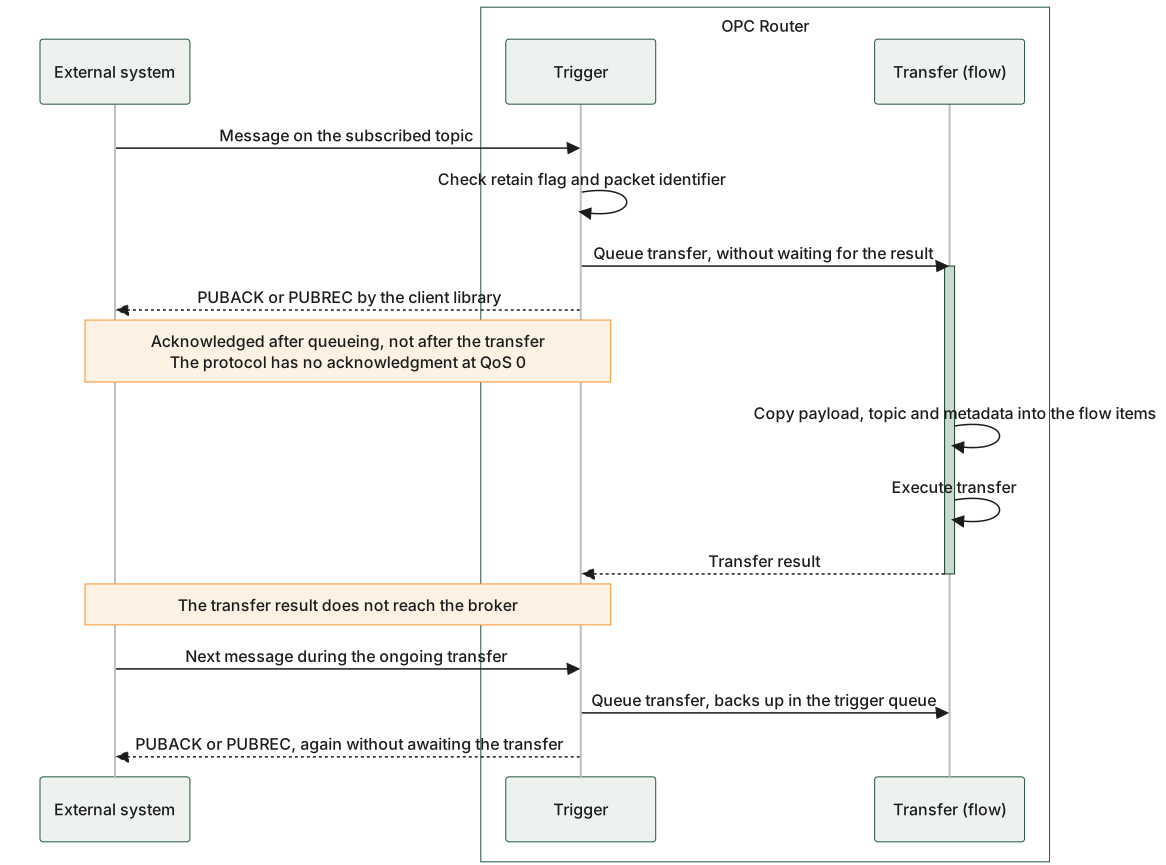
The acknowledgment to the broker precedes the transfer result but follows the handoff: the trigger checks the retain flag and packet ID, queues the transfer, and returns—only then does the client library confirm. The transfer then proceeds without any interaction with the broker, and its result is not reported back. Subsequent messages are acknowledged in the same way and are queued by the trigger.
Wait for Transfer: on (QoS 1 or 2)
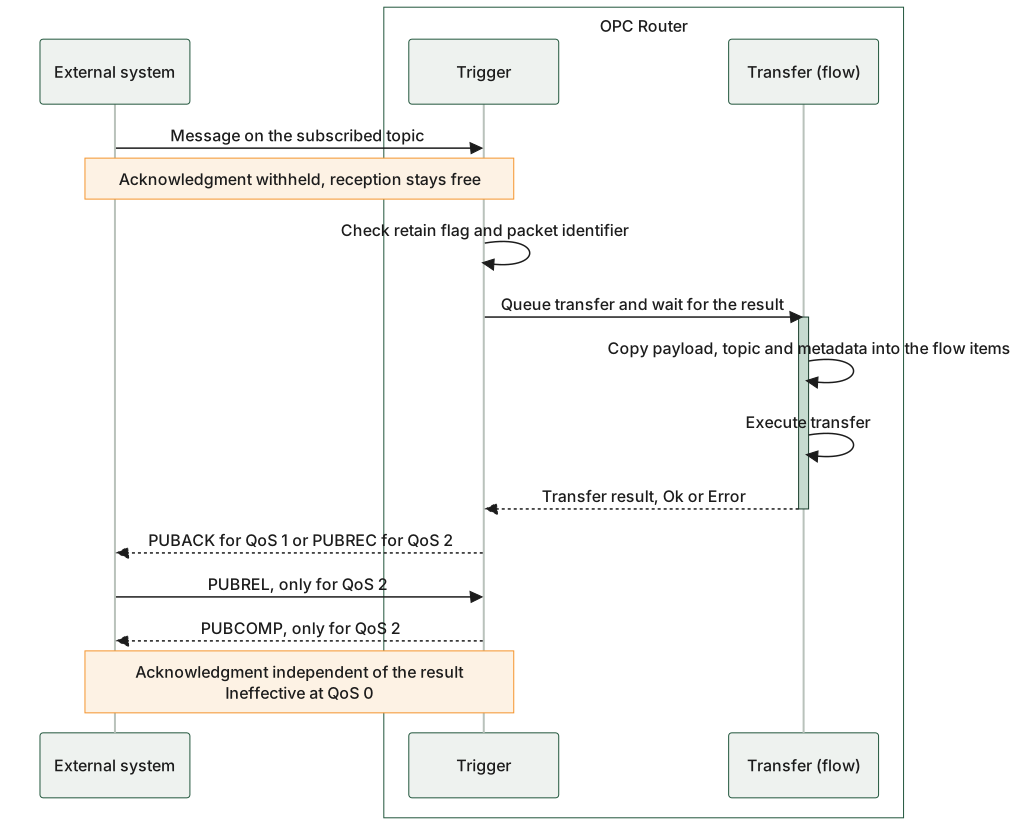
The acknowledgment is now pending behind the transfer: the router holds it back and sends it only after the transfer is complete. The wait occurs not in the receive path, but in the pending acknowledgment. The content of the acknowledgment is always the same; a failed transfer is not reported to the broker as an error. If no transfer takes place at all, no acknowledgment is sent, and the broker resends the message.
Timing of the broker acknowledgment relative to the transfer: without the <Ui>Warte auf Transfer</Ui> option, acknowledgment occurs after the transfer is queued; with the option, it occurs only after the transfer is complete.
Shared Subscriptions (MQTT v5)
Shared Subscriptions are a feature of MQTT Version 5 and require support from both the broker and the client.
With Shared Subscriptions, multiple clients can join a shared consumer group and distribute incoming messages evenly among themselves. This enables horizontal scaling on the receiver side.
Topic Format
$shared/[groupName]/[topic]
Example:
$shared/inrayTest/SharedSubscriptionTest
Behavior
- Messages are distributed according to the round-robin principle or, depending on the broker, via “fair dispatch.” The goal is to distribute the load as evenly as possible among the clients within a group.
- Each published data record is delivered exactly once to a subscriber of the shared group (taking into account the respective QoS level).
- Clients with different
groupNamevalues receive messages independently of one another—each group operates in isolation.
Prerequisites
- Support for MQTT Version 5 by both the broker and the client.
- All participating clients must connect to the identical shared subscription topic (including the same
groupName) to be part of the same consumer group.
QoS Behavior
| Aspect | Description |
|---|---|
| QoS Support | QoS continues to be applied as usual (0, 1, or 2). |
| Impact on Distribution | The shared subscription affects only distribution, not the delivery guarantee. |
| Retry Attempts | If QoS > 0, depending on the broker implementation, retry attempts may occur if a client does not acknowledge. |
Limitations and Special Features
| Aspect | Description |
|---|---|
| Message Order | The order is not guaranteed, as different clients process messages. |
| Stateful Processing | If states or sequences are relevant, they must be managed externally. |
| Broker Dependency | The exact behavior (e.g., distribution strategy) may vary depending on the MQTT broker. |
Example
Publisher sends to:
SharedSubscriptionTest
Subscribers use:
$shared/inrayTest/SharedSubscriptionTest
With three active clients in the inrayTest group, incoming messages are distributed, e.g.:
| Message | Delivered to |
|---|---|
| Message 1 | Client A |
| Message 2 | Client B |
| Message 3 | Client C |
| Message 4 | Client C |
MQTT 5 User Properties
The MQTT 5 User Properties tab is used to make MQTT 5 user properties from received messages available in the flow.
MQTT-5 user properties are freely definable key-value pairs that are transferred in addition to the actual payload. They therefore do not contain payload data in the strict sense, but rather supplementary metadata about the message.
Typical use cases include:
- Identifying the origin of a message, for example,
Quelle=Anlage 3, , * ; passing additional business information, for example,Nachrichtentyp=AlarmorBereich=Abfüllung, , * ; passing additional technical details, for example,SchemaVersion=1.0, , * ; evaluation in subsequent transfers or target systems that specifically take MQTT-5 user properties into account
Use this tab only if the receiving or downstream processing system actually requires MQTT-5 user properties. If this metadata plays no role in your flow, the tab can remain unused.
As with the MQTT transfer object, MQTT-5 user properties do not replace the actual message content. Content that requires business-specific processing should continue to be transferred in the payload or within a clear topic structure.