IDoc Trigger
The IDoc trigger is used when the OPC Router is to receive IDocs from the SAP system. The SAP system triggers the transfer via the IDoc trigger. The SAP-side configuration is only explained in broad terms. Please refer to the SAP documentation for more details.
The following properties can be configured:
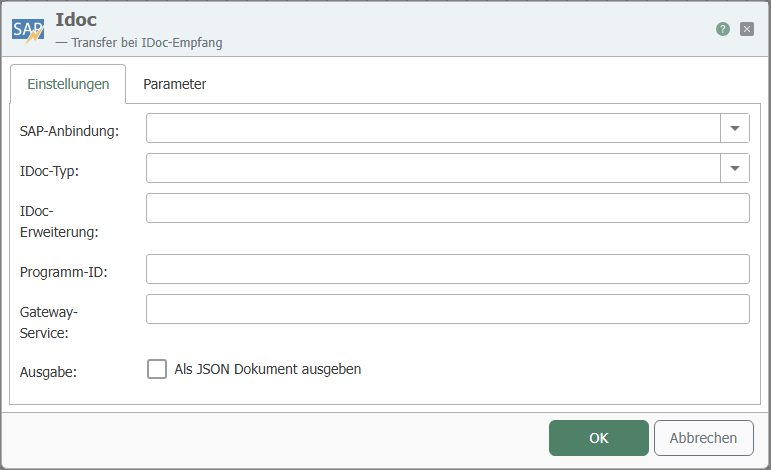
"Settings" tab
| Property | Description |
|---|---|
| SAP connection | SAP connection through which the relevant function is accessed. |
| IDoc type | IDoc type for which the trigger is activated when sent. Should be identical to the type set in the IDoc transfer object. |
| IDoc extension | Class extension of the IDocs |
| Program ID | Program ID used by the SAP system to call the destination, identical to the program ID of transaction SM59. |
| Gateway service | Gateway service of the SAP system |
| Output | Set this field if you want to receive output as JSON. |
"Parameters" tab
| Property | Description |
|---|---|
| Available parameters | Select the required parameters by checking the corresponding boxes. You can also select entire categories. |
| Copy JSON format | Copies a JSON document to the clipboard whose structure corresponds to the function call. |
Important: The program ID and function name must be written in UPPERCASE. The combination of host (SAP connection), gateway, and program ID must be unique. The program ID itself can be used multiple times from version 3.1.1.5 onwards – but only with different gateways/hosts.
Important: If an IDoc is updated/changed in SAP, the trigger must also be adapted to the new IDoc.
Example
Settings for the IDoc trigger:
| Property | Configuration |
|---|---|
| SAP connection | <sap-anbindung>, via which the relevant function is accessed. |
| IDoc type | PRODUCTIONORDER |
| Program ID | INRAYTRIGGER |
| Gateway service | Gateway service of the SAP system, e.g., 3302 |
Logical system in SAP transaction BD54:
| Property | Configuration |
|---|---|
| LogSystem | OPCRIDOC01 |
| Description | OPC router with IDoc listener |
Corresponding SAP settings, SM59:
| Property | Configuration |
|---|---|
| Destination | OPCROUTER |
| Connection type | T TCP/IP |
| Activation Type | Registered Server Program |
| Program ID | INRAYTRIGGER |
| Gateway Host | (no entry!) |
| Gateway Service | (no entry!) |
Port in SAP Transaction WE21:
| Property | Configuration |
|---|---|
| (Type) | Transactional RFC |
| Port | e.g., IDOCPORT |
| Version | (select appropriate IDoc version) |
| RFC destination | OPCROUTER |
Partner agreement in WE20:
| Property | Configuration |
|---|---|
| (Partner type) | LS (logical system) |
| Partner number | OPCRIDOC01 |
Output parameters in WE20:
| Property | Configuration |
|---|---|
| Receiver port | IDOCPORT |
| Output mode | Transfer IDoc immediately |
| IDoc type/base type | PRODUCTIONORDER |
| Syntax check | (activated) |
For manual testing, an IDoc can be sent via WE19 by specifying the partner number and port. Start IDoc outbound processing immediately must be activated. Any errors can be viewed in WE07. The function to be called in SAP is called IDOC_INBOUND_ASYNCHRONOS (from 4.0) or INBOUND_IDOC_PROCESS (3.x).