Secure redundancy
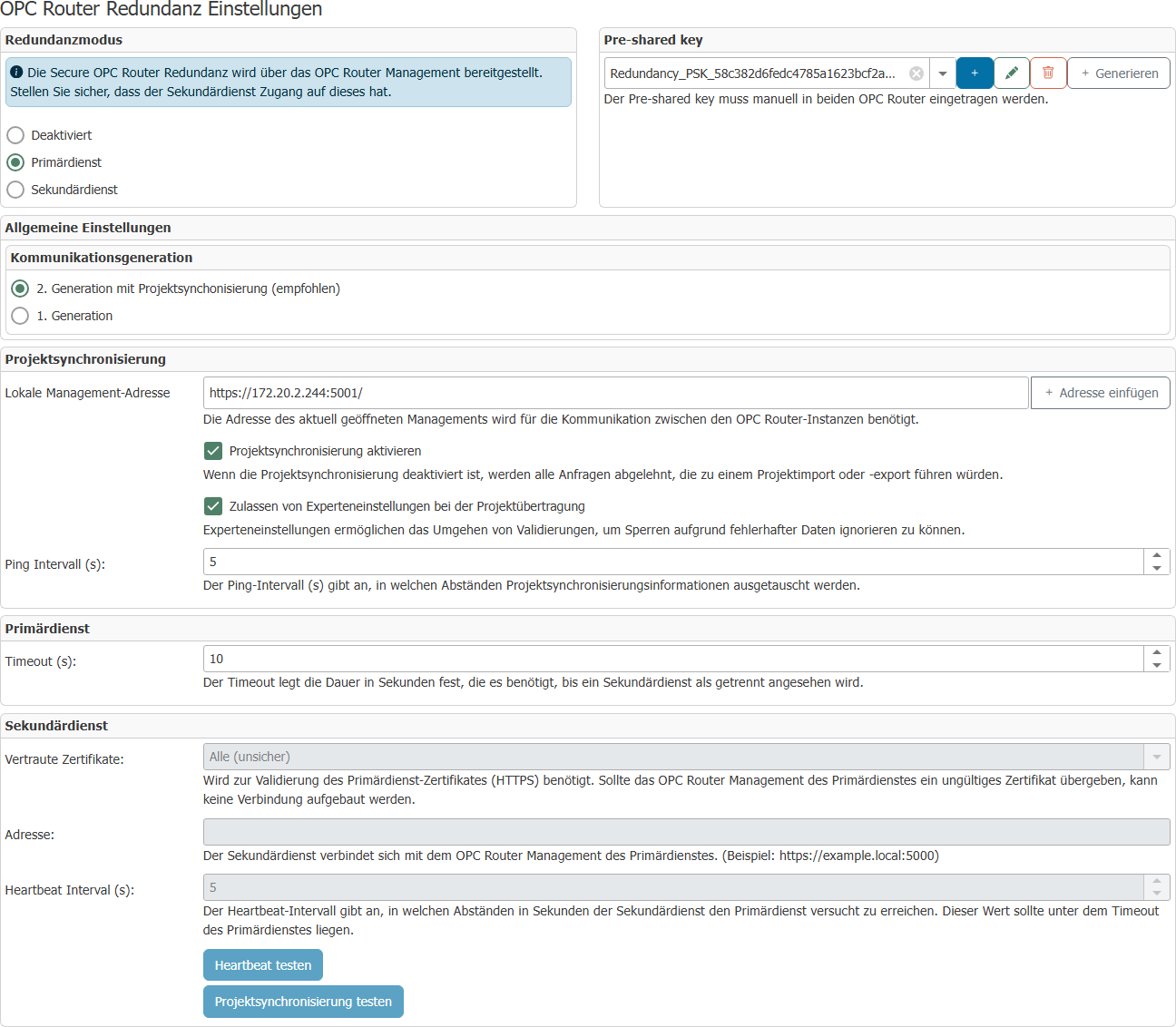
Configuring secure redundancy
Project synchronization
In order for the primary and secondary services to synchronize a project, both must be configured to indicate how their respective management can be reached in the network for the other. The actual synchronization can be performed later via the redundancy status in the header menu:
-783c0b2bf81e94de2df76ed03fb9557b.png)
Here, in addition to the basic status, you can see whether and when project synchronization has taken place and restart it if necessary.
Redundancy mode
Primary service
The primary service receives heartbeat signals from the secondary service. If the heartbeat signals are interrupted, a warning is displayed. If the primary service is no longer available, the secondary service takes over.
| Property | Description |
|---|---|
| Pre-shared key | String used to authenticate the OPC router. A secure string can be generated using the "Generate" button. |
| Timeout | Time in seconds after which the secondary service is considered disconnected if no heartbeat has been sent. |
Secondary service
The secondary service is in standby mode as long as the primary service is available and starts as soon as the primary service is no longer available. The connection to the opposite service can be tested using "Test heartbeat". "Test project synchronization" can be used to check whether all necessary communication channels of the OPC routers involved can be established and the necessary data can be exchanged. No check is made to see whether the necessary settings have been made or whether synchronization would actually have been successful.
For the connection test to work, the redundancy configuration must be active in production.
| Property | Description |
|---|---|
| Pre-shared key | String used to authenticate the OPC router. A secure string can be generated using the "Generate" button. |
| Trusted certificates | If an HTTPS address is specified, you can select which certificates should be trusted here:
|
| Address | Address of the primary service. This is specified in URL format (http(s):hostname/IP address:port). The port must be the port under which the Web Management (the web interface of the OPC router) is accessible. |
| Heartbeat Interval | The interval in seconds during which the secondary service attempts to reach the primary service. |
Disabled
In this mode, redundancy is inactive.
Note: The port of the primary service's Web Management must be enabled in the firewall so that the secondary service can connect.
The status changes caused by redundancy are logged. A log entry is created when redundancy becomes active (primary router has failed) or becomes inactive again (primary router is accessible again).
Environment variables
Several settings for redundancy behavior can be set via environment variables.
Settings configured via environment variables always override settings made via the UI.
SAP® triggers can be problematic in redundancy mode with identical user data. Problems arise because the plug-ins are also initialized in the secondary system and want to access the same user data.