Legacy redundancy
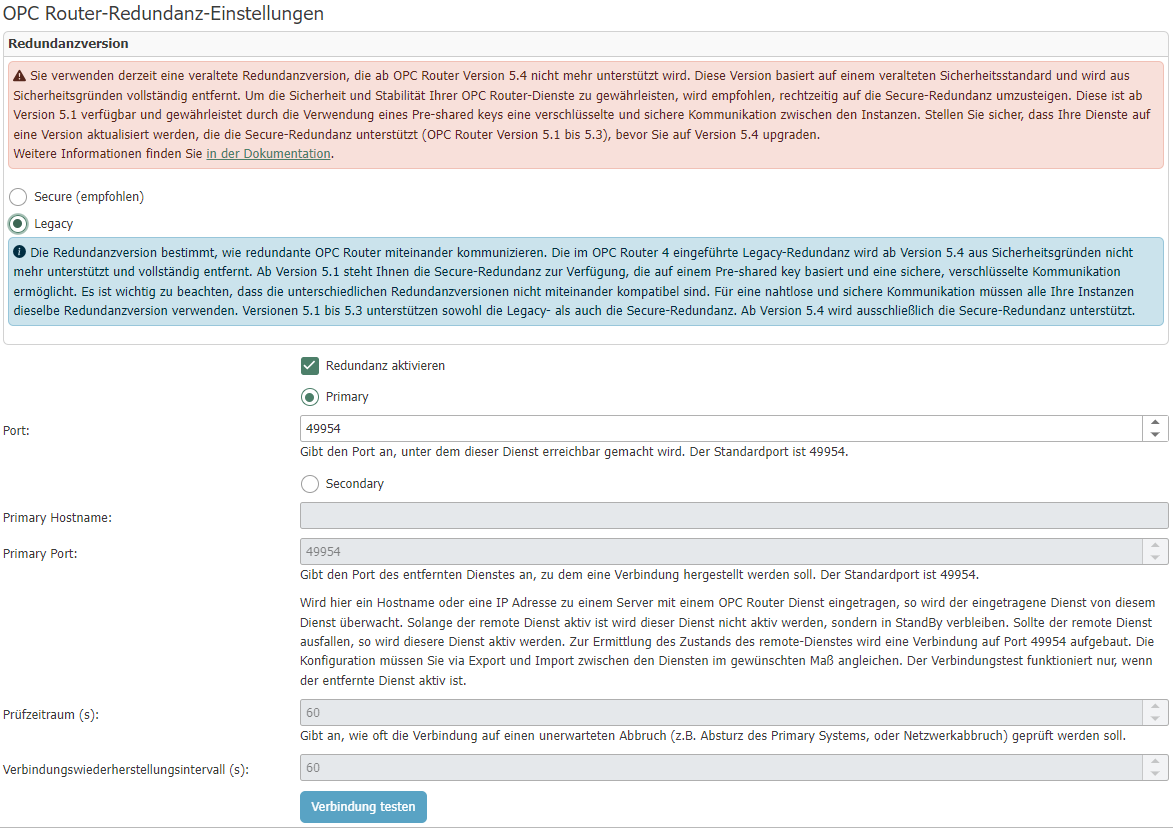
Configuring Legacy Redundancy
| Property | Description |
|---|---|
| Enable redundancy | This option determines whether the redundancy service is active. |
Primary
The runtime behavior of the OPC router in primary service mode does not differ from a service on which redundancy is disabled.
| Property | Description |
|---|---|
| Port | Port at which the redundancy service is accessible. |
Secondary
The secondary service is in standby mode as long as the primary service is accessible and starts as soon as the primary service is no longer accessible.
| Property | Description |
|---|---|
| Primary Hostname | Hostname of the server on which the primary service is running. |
| Primary Port | The port on which the primary service provides the redundancy service. |
| Check interval | The interval at which the system checks whether the primary service is still available. |
| Recovery interval | The interval at which the system checks whether the primary service is available again. |
note
Note: Enable the port in the firewall.
The status changes caused by redundancy are logged. A log entry is created when redundancy becomes active (primary router has failed) or becomes inactive again (primary router is accessible again).
Caution
SAP® triggers can be problematic in redundancy mode with identical user data. Problems arise because the plug-ins are also initialized in the secondary system and want to access the same user data.