Heidenhain Transfer Object
Heidenhain controllers are available as both sources and destinations. The required Heidenhain controller must be configured as a plug-in instance. Create a Heidenhain transfer object within the flow as described.
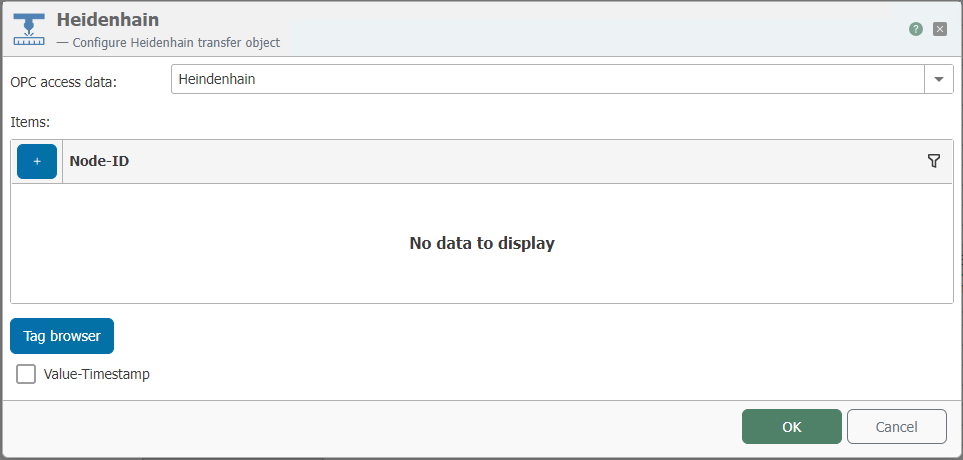
After double-clicking the transfer object, set the following properties:
| Property | Description |
|---|---|
| Connection | The Heidenhain controllers are available here as configured instances of the OPC plug-in. If the Heidenhain connection is to be determined as a template variable at runtime, please follow the corresponding instructions. |
| Data Points | Enter the required data points here. Use the Tag Browser for convenient selection. |
| Value Timestamp | Optional. If enabled, you can output the timestamp for each data point. |
Using the Tag Browser
Clicking the “Tag browser” button opens another window—the Tag Browser—in which the available data points are displayed in a graphical structure. When you enter a search term, the tree is hidden and all data points that match the search term are displayed.
The Heidenhain Transfer Object dialog and the Tag Browser are not modal; this means you can switch between the two windows as desired while editing.
- In the item list, select the row where the new item should be placed. This can be an existing row (the entry will be replaced) or the last row (*).
- Open the Tag Browser
- Double-click the desired Heidenhain item. It will be applied.
In the Tag Browser, you can now also select “Automatic data points” for each machine. These cannot be edited. The following data points can be selected:
- ExecutionMode
- ProgramStatus