OPC UA Server Plug-in
You can configure the following properties in the OPC server settings:
Server Properties
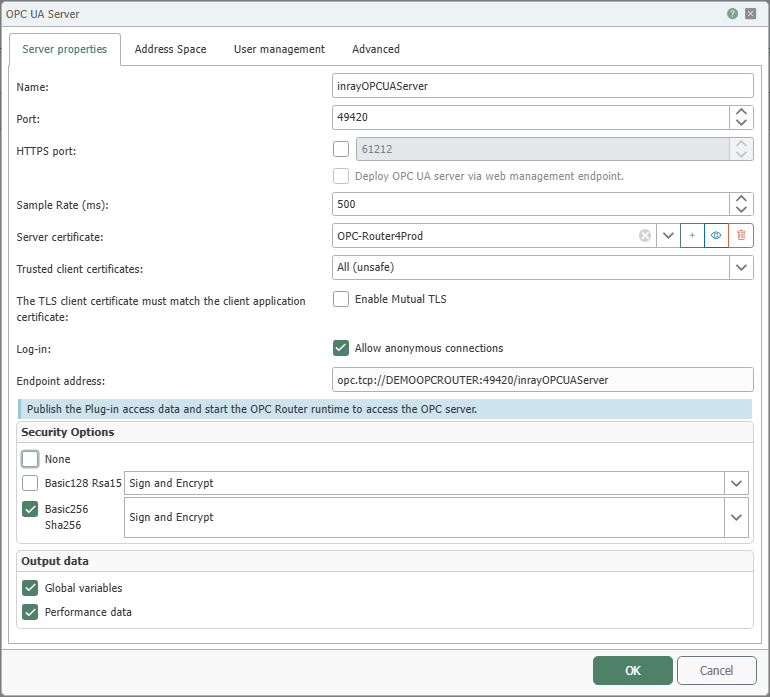
The figure shows the configuration dialog for general server properties. In this section, you define the name, communication ports, certificates, allowed authentication methods, and the endpoint address. In the lower section of the dialog, you also configure the allowed security profiles and control whether global variables and performance data are published in the address space.
| Property | Description |
|---|---|
| Name | Defines the unique display name of the OPC UA server instance in the Flow project configuration. Use a name that clearly describes the server’s function or scope of application. |
| Port | Specifies the TCP port through which the OPC UA server is accessible for classic OPC UA connections. The port must be available on the target system and must not already be in use by another service. |
| HTTPS port | Additionally activates an HTTPS endpoint for the OPC UA server. After activation, use the input field to specify the HTTPS port through which the endpoint will be published. For information on authentication, security policies, and reverse proxy behavior, see the chapter “ OPC UA Server via HTTPS” at . |
| Deploy the OPC UA server via the web management endpoint. | Additionally publishes the OPC UA server via the web management endpoint. Use this option if the server is to be accessible via the web management infrastructure. With Siemens Industrial Edge, the client must use the address without /opcrouter in order to establish a connection. For more information, see the chapter “ OPC UA Server via HTTPS” at . |
| Sample Rate (ms) | Specifies the update interval for output values in milliseconds. After this interval has elapsed, the server provides new values for subscribed or read data points. |
| Server Certificate | Specifies the certificate that the OPC UA server uses to authenticate itself to clients. The certificate is used for signed and encrypted connections. You can create a new certificate by clicking the plus icon. |
| Accepted Client Certificates | Specifies the certificate source from which client certificates are accepted. With “All (unsafe)”,” the server accepts all client certificates and thus does not perform a trusted preselection. With “Router,” only certificates from the OPC Router’s certificate management are used. With “Windows,” certificates from Windows Certificate Management are used. |
| Enable Mutual TLS | Ensures that the TLS client certificate matches the client application’s identity. Enable this option only if your clients use consistent and managed application and client certificates. |
| Login: Allow anonymous login | Allows connections to be established without user authentication. Enable this option only in environments with correspondingly reduced security requirements or for testing purposes. |
| Endpoint Address | Displays the endpoint address generated from the current settings. OPC UA clients use this address to access the server. In container environments, an internal hostname or container identifier may appear here that is not directly accessible from outside the container. In this case, ensure that the port is exposed to the host and that clients use the host address, or that the client and OPC Router are on the same Docker network. For HTTPS and web management scenarios, also refer to the chapter “ OPC UA Server via HTTPS” at . |
Security settings
| Setting | Description |
|---|---|
| None | Provides an endpoint without signing or encryption. Use this option only in protected test or development environments. |
| Basic128 Rsa15 | Enables an endpoint with the Basic128Rsa15 security policy. Use the selection on the right to additionally specify the message mode, such as sign only or sign and encrypt. |
| Basic256 Sha256 | Enables an endpoint with the Basic256Sha256 security policy. Use the selection on the right to additionally specify the message mode, such as sign only or sign and encrypt. |
Data Provisioning
| Data | Description |
|---|---|
| Global Variables | Publishes the OPC Router’s global variables in the OPC UA server’s address space. This allows clients to access these variables. |
| Performance Data | Publishes operational and diagnostic data from the OPC Router service in the address space. Use this data for monitoring, analysis, and troubleshooting. |
Address space:
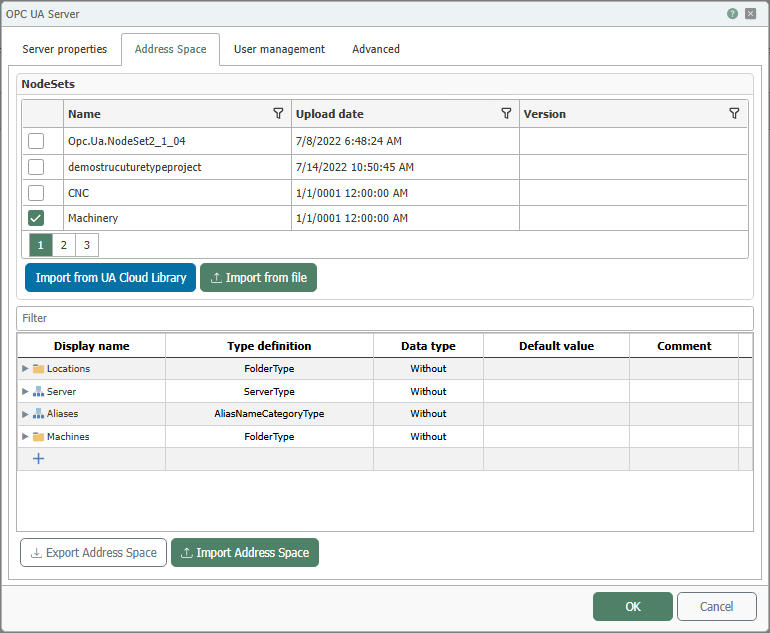
In the upper section, existing NodeSets from the UA Cloud Library or from your own sources can be imported and integrated into this address space. For more information, see the NodeSets chapter.
Define the OPC UA address space to be provided:
The columns have the following meanings:
- “Display name”: Name of the element in the address space.
- “Type definition”: Type of the element, for example, object, folder, variable, or method.
- “Data type”: Data type of the variable.
- “Default value”: Initial value of the variable.
- “Comment”: Free text for documenting the element.
If a NodeSet contains methods, these are listed in the address space. The logic is not defined directly here, but rather via a flow with an OPC method trigger. The content of the method is determined by the data transfer configured in this flow. For details, see the chapter Using OPC Methods.
If data points are to be generated at runtime or written via clients, also refer to the chapter Writing Data via the OPC UA Server.
User Management
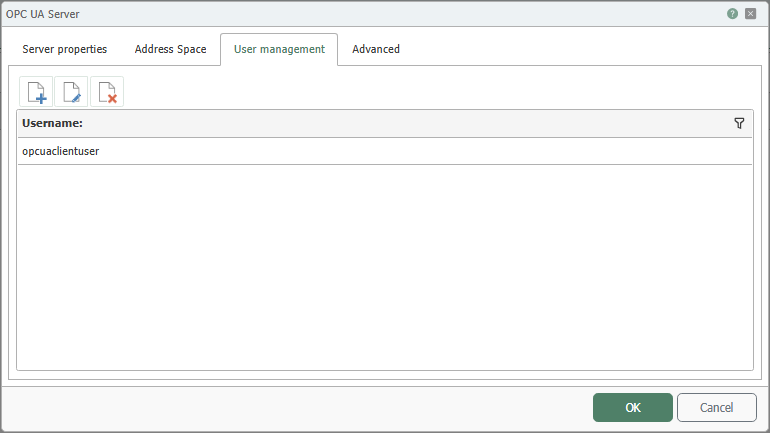
The figure shows an overview of the created user accounts. Using the user management feature, you can define different users with various permissions, such as “Read values” or “Write values”, as well as edit or delete existing accounts.
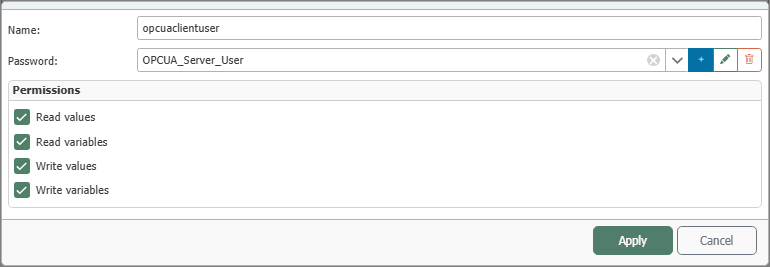
In the dialog for editing a user, you define the login credentials and specify which actions the respective user is allowed to perform on the OPC UA server.
Advanced
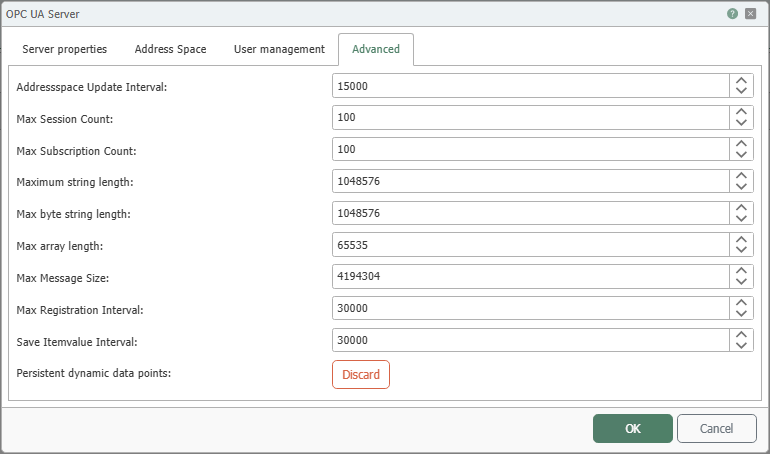
The advanced properties group together update intervals and thresholds for sessions, subscriptions, messages, and data formats. These settings allow you to control the server’s resource behavior and specify the intervals at which the address space and stored item values are updated.
| Property | Description |
|---|---|
| Address Space Update Interval | Specifies the interval at which changes to the address space are updated internally and take effect for clients. Smaller values increase timeliness but may increase system load. |
| Max Session Count | Limits the maximum number of client sessions that can be open simultaneously. Increase this value only if the expected number of clients requires it. |
| Max Subscription Count | Limits the maximum number of active subscriptions across all connected clients. This limits the load caused by monitoring and data reports. |
| Maximum String Length | Sets the maximum allowed length of string values in characters. Values exceeding this limit cannot be fully transferred or processed. |
| Max ByteString Length | Sets the maximum allowed size of ByteString values in bytes. Use this limit to control memory usage and transmission size. |
| Max Array Length | Sets the maximum allowed number of elements per array. This limit protects the server from oversized data structures. |
| Maximum Message Size | Limits the maximum size of an OPC UA message in bytes. This value determines the maximum size of individual requests or responses. |
| Max Registration Interval | Specifies the maximum time interval within which a client must renew its registration or communication before the connection is treated as invalid. |
| Interval for Saving Item Values | Determines the interval at which current item values are persistently saved. Use smaller values if you want current values to be available again more quickly after a restart. |
| Persisted dynamic data points: Discard | Use the “Discard” button to discard previously persisted dynamic data points. Use this function if you want to remove OPC items that were created at runtime and persisted. |
A server always starts with one object. The structure below that can be freely defined.