OPC Method Trigger
OPC UA methods allow an OPC UA client to specifically execute functions or actions on an OPC UA server. A method can be called with input parameters and, optionally, return results to the calling client.
With the OPC Method Trigger, the OPC Router provides an OPC UA method that can be called by external OPC UA clients. The method call serves as a trigger for a flow in the OPC Router. The parameters passed during the call can be further processed in the flow and transferred to connected systems, plug-ins, or target components.
The trigger is particularly well-suited for scenarios in which an OPC UA client is not only supposed to read or write values, but also actively start a process in the OPC Router—for example, a data transfer, a posting, a recipe change, or the transfer of production information.
Dialog Overview
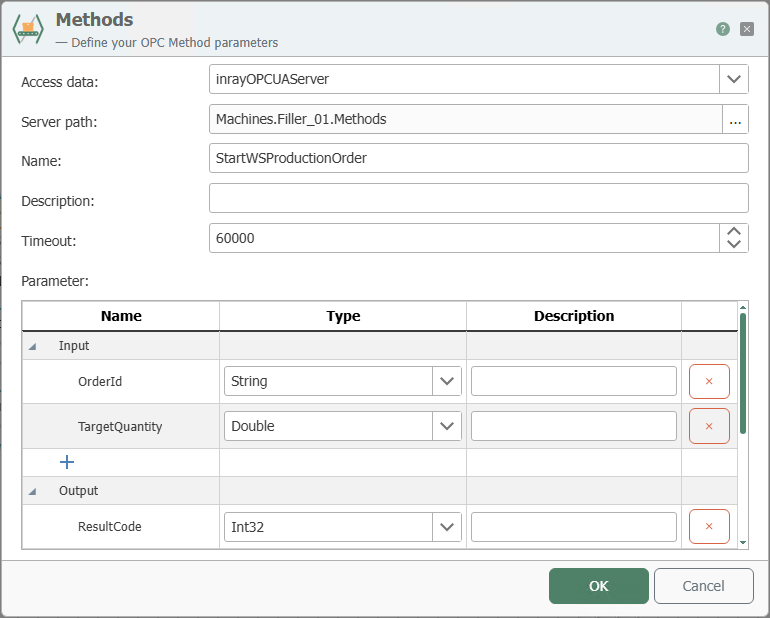
The screenshot shows the configuration dialog for the OPC Method Trigger. In the dialog, first select the internal OPC UA server and the target path in the address space. Then define the name, description, timeout, and the method’s input and output parameters.
Configuration
| Property | Description |
|---|---|
| Connection | Select the internal OPC UA server through which the method is accessible. |
| Server Path | Select the path where the method should be located. You can click the button with the three dots "..." to use the tag browser. |
| Name | Select a name for the method. |
| Description | Describe what your method does. |
| Timeout | Time in milliseconds that the calling client waits for the result. If it expires, the call returns a timeout as the result—the transfer itself continues. What terminates a running transfer is the connection timeout, not this field. |
The Timeout field only limits how long the calling OPC-UA client waits for the result . Once the timeout expires, the call returns a timeout error, while the transfer continues in the OPC Router and describes its targets as planned. The caller will then no longer receive the result .
A running transfer is terminated exclusively by the connection timeout. Therefore, if a call is not only to remain unanswered but the data transfer is to be actually aborted, the connection timeout is the appropriate setting for this.
Parameters
Input and Output Parameters
| Property | Description |
|---|---|
| Input | Define any number of input parameters, select the data types, and add a description if necessary. |
| Output | Define any number of output parameters, select the data types, and add a description if necessary. |
Procedure in the Dialog
- Select the desired internal OPC UA server connection.
- Use the tag browser to select the server path under which the method is to be made available in the address space.
- Assign a unique method name and add a description if necessary.
- Set the timeout and define the required input and output parameters.
Interaction with the calling OPC UA client
The section on sequence diagrams explains how to interpret this diagram.
The OPC method trigger operates synchronously: The calling OPC UA client remains blocked in its call until the flow has completed. Only the transfer result determines the status code of the response (OK becomes Good, an abort becomes Bad_OperationAbandoned, and an error becomes Bad with the abort text). The output arguments are not provided by the trigger itself, but by the “to OPC client” transfer object, which you must place in the flow; similarly, the “from OPC client” transfer object reads the input arguments into the flow. Please note the two independent time limits: The “Timeout” field in the dialog exclusively limits the client’s wait time, not the transfer itself.
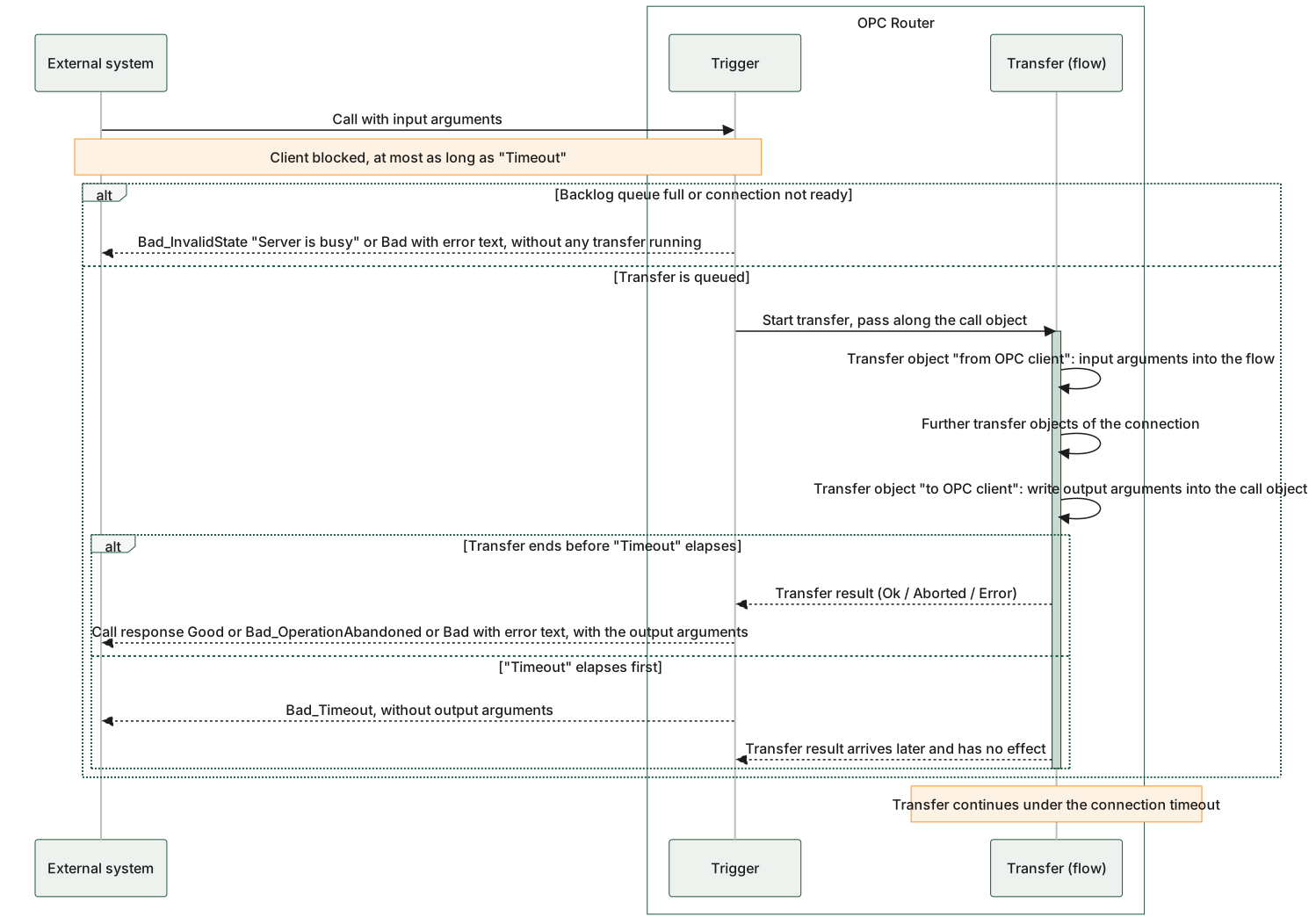
The diagram applies to both toolbox variants, the Method Trigger and the Predefined Method Trigger: They differ only in the engineering of the method, not in the flow. It is evident that the output arguments are written to the same call object in the middle of the transfer, and the status code is generated from the transfer result only at the end. The two alt blocks show the two time limits and the two immediate rejections, which are handled before each transfer begins. The Timeout time limit is a field in the trigger dialog and solely limits the waiting time of the calling client: If it expires, the transfer continues under the connection’s own timeout; the Timeout field does not terminate it.
Flow of a method call on the internal OPC UA server: Immediate rejections without a transfer, output arguments from the “to OPC client” transfer object, and the “Timeout” limit, which only terminates the client’s wait.