Microsoft SQL Server Plug-in
The Microsoft SQL Server Plug-in allows the OPC Router to connect Microsoft SQL Server to other systems and data sources. You can read, write, update, and delete data, as well as execute SQL queries and stored procedures. Typical use cases include connecting SQL Server to other plug-ins such as OPC UA, MQTT, or SAP.
This page provides a concise overview of the plug-in and highlights the most important topics for setup, operation, and performance.
Basic Steps for Connecting
To connect to a Microsoft SQL Server, follow these steps:
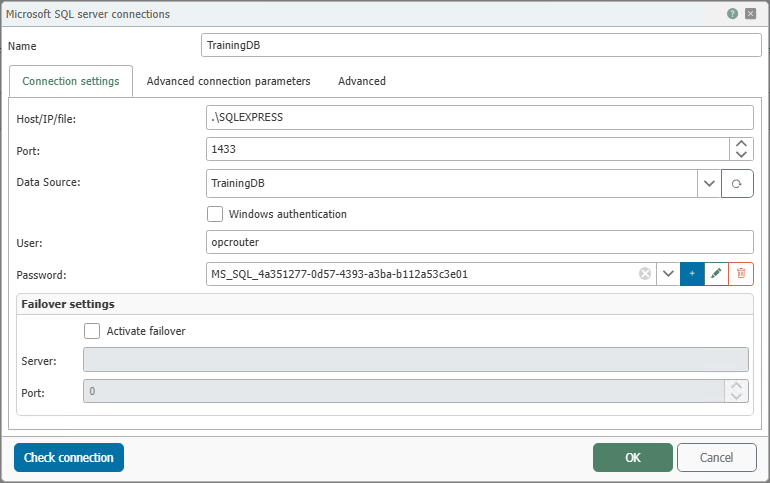
- Open the corresponding plug-in by going to the “Plug-ins” menu, clicking “Storage”," and then clicking “Microsoft SQL server connections”."
- Click the plus button in the table header or double-click an existing entry.
- Configure the necessary settings, particularly for connection, authentication, and advanced parameters (see Configuration and Authentication ).
- Confirm by clicking “OK”.
The Microsoft SQL Server connection is now available for Flow project design.
Typical Tasks with the Plug-in
With the Microsoft SQL Server plug-in, you can, for example:
- Read tables and views
- Insert, update, and delete records in tables
- Call stored procedures
- Monitor data changes via triggers or SQL Server notifications
The actual data transfer is handled via the generic relational transfer objects and triggers. The MS-SQL-specific pages primarily describe the connection settings and the special features of Microsoft SQL Server.
Overview of Important Topics
The most important subpages include:
- Authentication for selecting and evaluating supported login methods.
- Configuration for connection parameters, timeouts, timestamps, encryption, and advanced settings.
- Stored Procedures in SQL Server for calling stored procedures and handling parameters and result sets.
- Service Broker for Data Change Notifications to receive notifications of data changes without relying solely on polling.
- Microsoft SQL Server Performance Guide for information on indexes, service permissions, and performance analysis.
Additional Information
- For information on the required roles and permissions for database operations, see Authentication.
- For information on
Connection TimeoutandCommand Timeout, see Configuration. - For information on database performance and SQL Server-specific optimizations, see the Microsoft SQL Server Performance Guide.