Oracle plug-in
The OPC Router uses the Oracle plug-in to establish a connection between an Oracle database and other systems and data sources. You can read, write, update, and delete data, as well as execute SQL queries and stored procedures. The connection is established via the Oracle client drivers and supports the connection types Hostname, TNS, and Cloud Wallet.
The actual data transfer is implemented using the generic relational transfer objects and triggers . Filter expressions are described at database filter operators , and end-to-end examples are available at examples and concepts . The advanced connection parameters and parenthesizing behavior are the same for all relational database plug-ins and are described at Common Connection Settings .
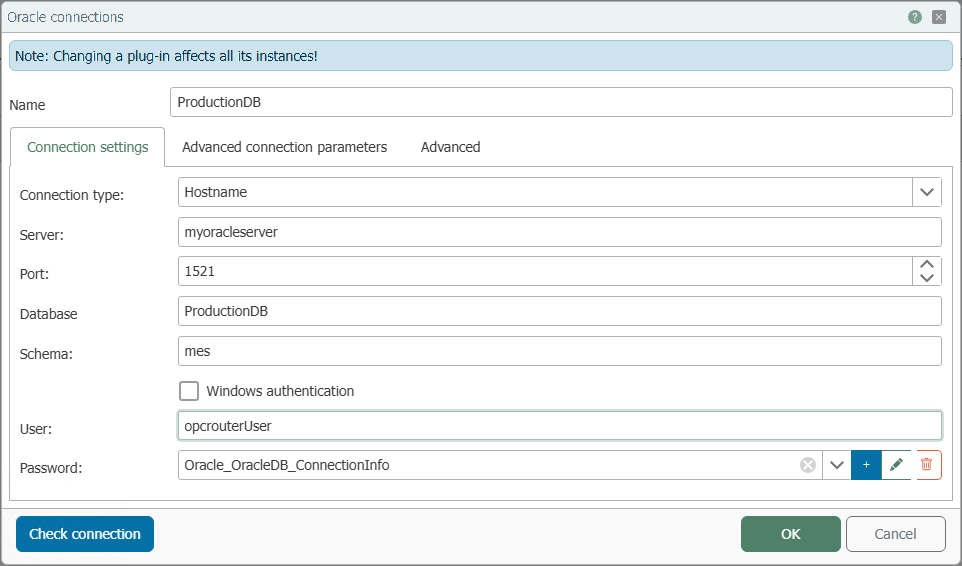
Connection Settings
| Property | Description |
|---|---|
| Name | Any name under which this database server appears in the Flow project design. Choose a name that is unique to you during Flow project design. |
Connection Type
The connection type determines how the OPC Router addresses the Oracle database. Select the type that matches your Oracle environment. Depending on the type, different fields will be displayed.
- Hostname: Direct connection via server name, port, and database. This is the simplest case when the address and port of the Oracle service are known.
- TNS: Connection via a TNS alias from the
tnsnames.ora. Suitable if an Oracle Net configuration with named aliases is already maintained on the OPC Router host. This requires an installed Oracle client with the appropriatetnsnames.ora(see “Oracle home” for the directory). - Cloud Wallet: Connection to an Oracle Autonomous Database or Oracle Cloud via a downloaded wallet (an encrypted archive of credentials from the cloud console).
- Hostname
- TNS
- Cloud Wallet
| Property | Description |
|---|---|
| Server | Server name or IP address of the Oracle server to which the OPC Router should establish a connection. |
| Port | Network port for the database connection. For Oracle, the default port is usually 1521. |
| Database | Database or service to which the connection should be established. Note: This property must be set for a successful connection test. |
| Schema | Oracle schema to be used. |
| Property | Description |
|---|---|
| TNS Name | Name of the TNS alias from the tnsnames.ora to be used. |
| Schema | Oracle schema to be used. |
Only one Cloud Wallet can be configured. Once a Cloud Wallet is in use, no other Oracle plug-in can be used.
| Property | Description |
|---|---|
| Cloud Wallet | Wallet file containing the database credentials. |
| Database | The database or service from the wallet to which you want to establish a connection. |
Authentication
There are two methods available for logging in to the Oracle database. The corresponding fields are located on the “Connection settings” tab below the connection fields.
| Property | Description |
|---|---|
| Windows Authentication | If this option is enabled, the OPC Router does not log in using the username and password from this screen, but rather using the Windows account of the OPC Router runtime service (external authentication). |
| User | Username for logging in to the Oracle server when Windows authentication is not used. |
| Password | Password for the specified user, stored as a secret. |
Oracle User and Password
The standard procedure is to log in using a user account created in the Oracle database and its password. The account must have the object permissions required for the desired actions (see Required Permissions ). Store the password as a secret and, if possible, use a dedicated account with the minimum necessary permissions.
Windows Authentication
When Windows authentication is enabled, the OPC Router logs in using the Windows account of the runtime service; the username and password from this dialog box are not required. An externally authenticated user must be set up in the Oracle database for this purpose.
This authentication method is only suitable for Windows systems and is not supported under Docker or Linux. During configuration, the permissions of the user under which the configuration environment is running apply; at runtime, those of the service account apply. For more information, see . For instructions on configuration of Windows user accounts for the OPC Router, see .
Required Permissions
In addition to logging in, the account you use must have the appropriate object permissions in the database. Which permissions are required depends on the transfer objects used and their options.
| Action in the Transfer Object | Required Permission |
|---|---|
| Select (without modifying records) | SELECT |
| Select with option “Mark records after transfer” | SELECT, UPDATE |
| Select with option “Delete records after successful transfer” | SELECT, DELETE |
| Insert | INSERT |
| Update | UPDATE |
| Delete | DELETE |
| Stored Procedures | EXECUTE |
Advanced Settings
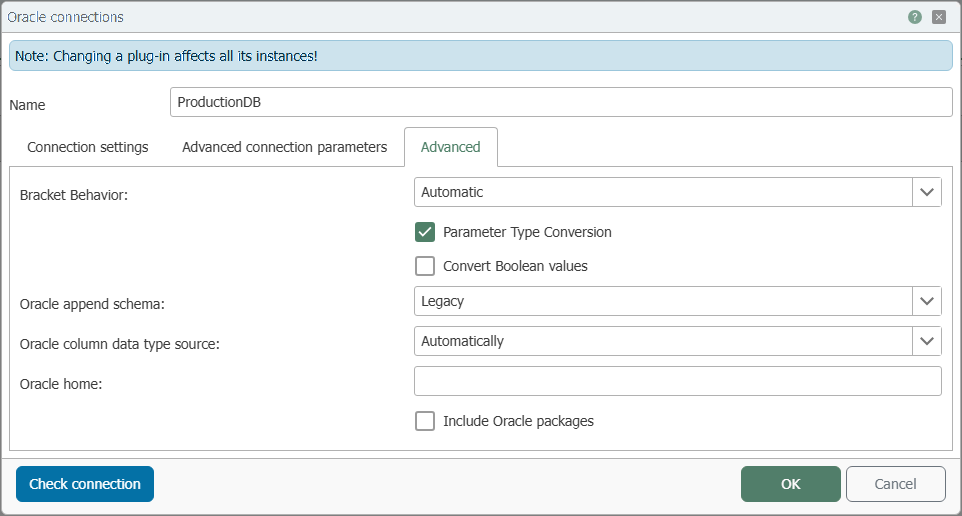
| Property | Description |
|---|---|
| Parameter Conversion | If this option is enabled, the OPC Router converts values to the expected SQL data type before sending them. If the option is disabled, the conversion takes place on the database side. |
| Convert Boolean Values | If this option is enabled, the values “1,” “y,” and “t” are converted to true, and “0,” “n,” and “f” are converted to false. |
| Oracle append schema | Specifies whether the schema is appended to the identifier. Legacy: Behavior as in the previous version. Yes: The schema is always appended—useful when there are multiple schemas in the same database. No: The schema is not appended. |
| Oracle column data type source | Specifies how column data types are handled. Automatic: Data types are converted to the best-fitting type during reading. Data Reader: Data types are retained unchanged during reading. |
| Oracle home | Directory in which the Oracle client software is installed. Required, among other things, for tnsnames.ora (TNS). |
| Include Oracle packages | If this option is enabled, stored procedures located in packages are also listed. |