Configuration
You can configure the following properties in the Microsoft SQL Server connection settings:
General
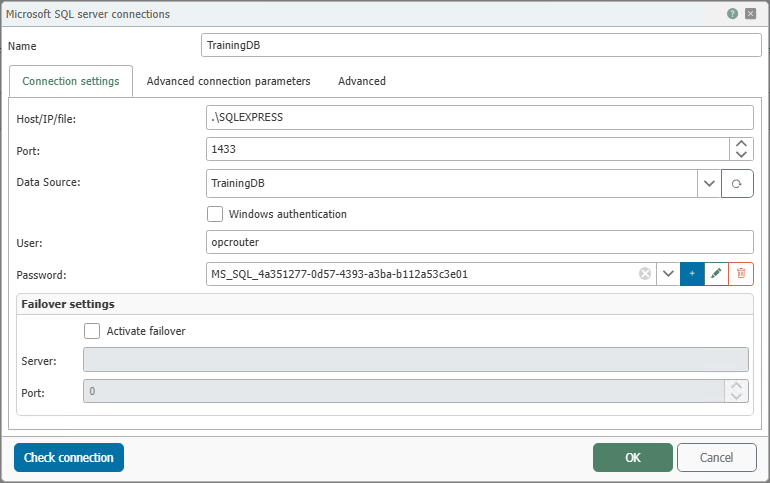
| Property | Description |
|---|---|
| Name | Any name under which this database server appears in the Flow configuration. Choose a name that is unique to you during Flow configuration. |
Connection Settings
Failover Settings
If you want to use a failover server in the OPC Router, you need a license for the Enterprise+ add-on. For more information on the scope of this feature, see Third-Party System Redundancy with Enterprise+.
| Property | Description |
|---|---|
| Host/IP/File | Server name or IP address of the Microsoft SQL Server to which the OPC Router should establish a connection. |
| Port | Network port for the database connection. For Microsoft SQL Server, the default port is usually 1433. |
| Data Source | Name of the database that the OPC Router should use on this SQL Server. |
| Windows Authentication | If this option is enabled, the OPC Router does not log in using the username and password from this dialog box, but rather using the Windows account of the OPC Router runtime service. This account must have the necessary permissions on the SQL Server and in the database. For more information, see Authentication and Notes on Configuration of Windows User Accounts for the OPC Router. |
| User | Username for logging into the SQL Server if Windows authentication is not used. |
| Password | Password for the specified SQL Server user. |
| Failover settings | In this section, you can enable and configure the use of an alternative SQL Server. The alternate server is used when the primary server is unavailable. This includes, in particular, enabling failover as well as specifying the address and port of the alternate SQL Server. This feature is part of the third-party system redundancy provided by the Enterprise+ add-on. The actual setup of a failover cluster continues to take place in Microsoft SQL Server. |
Advanced Connection Parameters
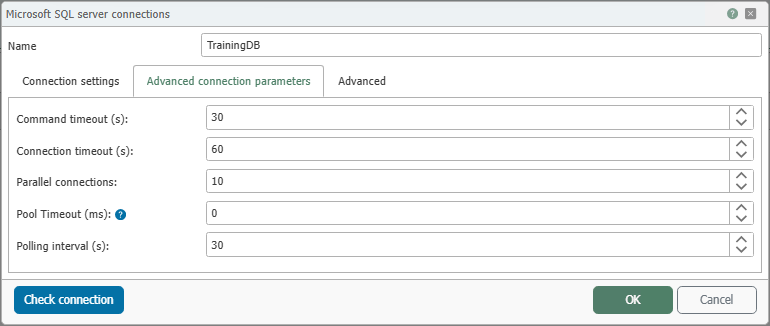
| Property | Description |
|---|---|
| Command Timeout (s) | Maximum time, in seconds, that the OPC Router waits for an SQL command to execute. For slow or very large queries, it may be necessary to increase this value. |
| Connection Timeout (s) | Maximum time, in seconds, allowed to establish a connection to the SQL Server. |
| Concurrent Connections | Number of database connections that the OPC Router is allowed to open simultaneously. Higher values can speed up processing but also increase the load on the database server and network. |
| Pool Timeout (ms) | Specifies the maximum time the OPC Router waits for a free connection from the connection pool. If no connection is available within this time, the database operation cannot be started and will result in an error. |
| Polling Interval | The time interval at which the OPC Router cyclically checks the database for changes. If SQL Server notifications are used instead, this value is less important. |
Relevant Timeouts
During communication between the OPC Router and Microsoft SQL Server, timeouts may occur if a connection or an SQL command is not completed within the expected time.
Types of Timeouts
- Connection Timeout: The maximum amount of time the OPC Router waits to establish a connection to Microsoft SQL Server.
- Command Timeout: The maximum amount of time the OPC Router waits for an SQL command to execute.
If you increase the Command Timeout, you should also adjust the OPC Router timeout for the affected connection accordingly. Otherwise, the timeouts may overlap and cause errors.
Common Causes of Timeouts
- High load on the Microsoft SQL Server
- Network issues between the OPC Router and the SQL Server
- SQL commands that take a long time to run or contain errors
Advanced
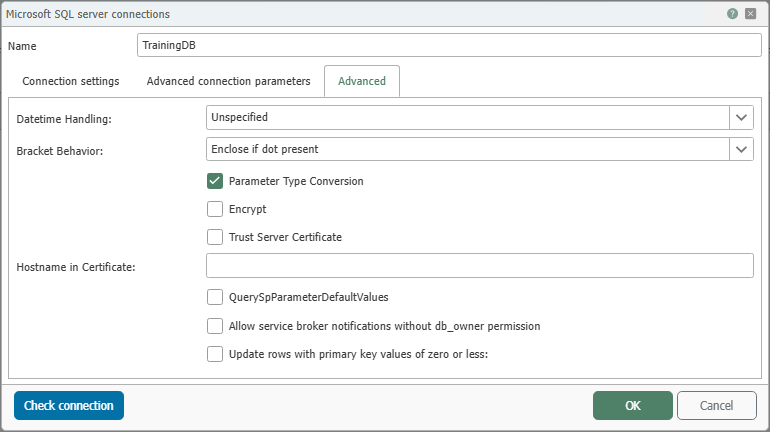
| Property | Description |
|---|---|
| Datetime Handling | Specifies how the OPC Router interprets timestamps when reading and writing. For more information, see Using Timestamps. |
| Bracket Behavior | Determines when SQL identifiers, such as table or column names, are enclosed in square brackets. For more information, see Bracket Behavior. |
| Parameter Conversion | When this option is enabled, the OPC Router attempts to convert values to the expected SQL data type before sending them. If the option is disabled, this conversion takes place on the database side. |
| Encrypt | Enables an encrypted connection to the SQL Server. This protects the transmitted data from interception on the network by encrypting it. |
| Trust Server Certificate | Specifies whether an SQL Server certificate is accepted even if it does not originate from a known or trusted certificate authority. |
| Hostname in Certificate | If necessary, specifies a different expected CN or SAN for the server certificate if the configured server name does not match the certificate. |
| QuerySpParameterDefaultValue | When this option is enabled, the OPC Router reads the default values of stored procedure parameters and stores them for future use. |
| Update rows with primary key values of zero or less | Determines whether update operations also include records whose primary key value is 0 or less. This is only useful in specific data models where such values are intentionally used. |
Using Timestamps
Timestamps contain a date and a time. In database projects, it is crucial to determine whether these values are interpreted as local time or UTC time. This interpretation depends in particular on the time zone used and the corresponding UTC or GMT offset. If this mapping is not consistent, time values may appear to be shifted by several hours when reading, writing, or comparing them.
The Datetime Handling setting determines how the OPC Router handles such timestamps.
We recommend using UTC.
Practical Recommendation
Whenever possible, use the same time base in all involved systems.
- If your database, the OPC Router, and connected systems use UTC, select
UTC. - If your time values are intentionally stored and processed as local time, select
Local. - Use
Unspecifiedonly if you are certain that no additional time zone handling is required.
If you are working with local timestamps, explicitly set the Datetime-Handling to Local in the “Advanced” tab of the Microsoft SQL Server plug-in.
Meaning of the Options
During data transfer, the OPC Router may perform data type conversions. If no time zone information is available, it generally uses the time zone of the OPC Router service. If a conversion occurs when inserting data into the database, the setting configured here is used.
It is particularly important to note that the same time value can be interpreted differently depending on the setting. A consistent configuration helps prevent unexpected time shifts.
| Option | Description |
|---|---|
| Unspecified | The OPC Router adopts the timestamp without additional conversion. This setting is useful if the time values are already in the desired format and no automatic time zone handling is to take place. |
| Local | The OPC Router treats the timestamp as the local time of the system or the configured process. This setting is useful if your database values are intentionally stored in local time. |
| UTC | The OPC Router treats or converts the timestamp to UTC time. This setting is the safest choice in many projects because UTC is independent of daylight saving time. |
Bracket Behavior
- Automatic: In this mode, the OPC Router decides on a case-by-case basis whether a table, column, or other object name must be enclosed in square brackets. The decision is based on Microsoft SQL Server specifications.
- Never Enclose in Square Brackets: In this mode, the OPC Router does not add square brackets. This is particularly useful if your identifiers have a simple structure and do not contain special characters, spaces, or reserved words.
- Always Enclose in Square Brackets: In this mode, the OPC Router places all identifiers in square brackets. This can be useful if object or column names may contain special characters, spaces, or reserved words.