Variable Plug-in
The variable plug-in allows you to define any number of variables with names, types, and initial values. At runtime, you can of course write values to the variables and trigger them again. In addition, there are several system variables available that you can use in your project planning.
Variables are therefore useful for fixed values that are needed repeatedly and are not stored in a database, or for temporarily storing values that cannot or should not be stored in a database. In complex projects, variables can also be used to make values available in multiple connections.
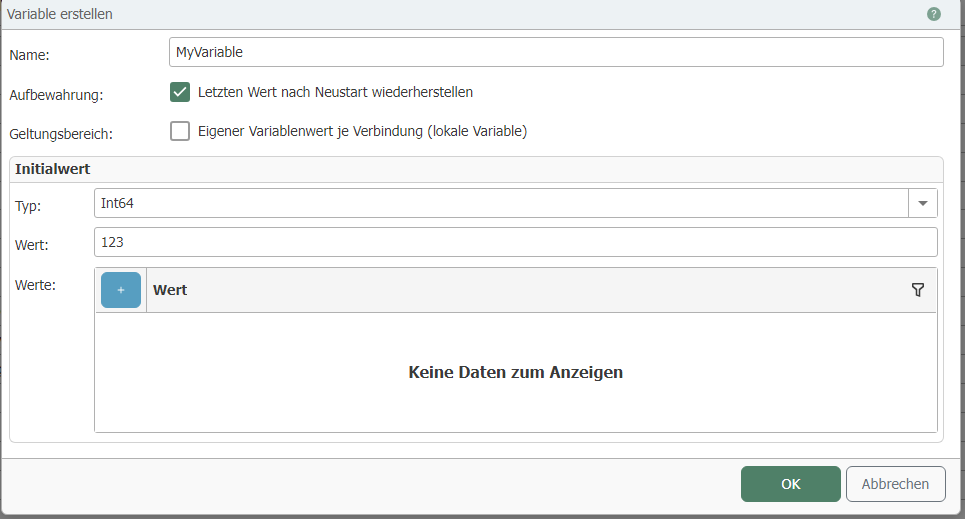
The default operation is as follows:
- Open the plug-in from the "Advanced" category under the "Plug-ins" menu by double-clicking on "Variables."
- Choose between global and local variables:
- Global variables: The variable value is always identical in all connections in which it is used.
- Local variables: The variable is declared individually in each connection. Each value assignment is only valid within the respective connection.
- Select "Add" or double-click on an existing entry.
- Make the necessary settings in the dialog box:
| Property | Description |
|---|---|
| Name | Name of the variable, appears in the project configuration. The variable name must be unique. |
| Storage | If active, the last value of the variable is reloaded after restarting the OPC router. If not active, the set initial value is loaded. Every variable change is stored in the database, except for local variables. |
| Scope | Activate this checkbox to generate a local variable. The values of the local variables are only available in the connections in which they are used. |
| Type | Select the appropriate data type so that the value can be interpreted without ambiguity—e.g., to distinguish a 1 as a number from a 1 as a Boolean value. Untyped is also possible; the variable can then be filled as desired. |
| Value | Initial value of the variable. You can read this value in the connection configuration and, of course, change it. You can also enter the value DB-NULL to output NULL values in the transfer object. |
- Confirm with "OK."
The variable is now available for configuring a connection.