REST Trigger
The REST trigger provides REST API endpoints. When a request is sent to the provided endpoint, a transfer is triggered. How to create a transfer object is described on the Projecting page.
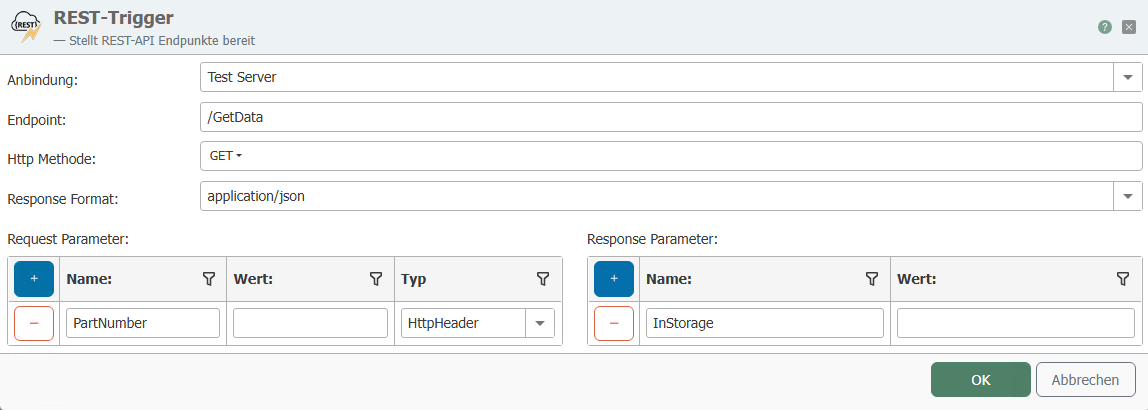
The following properties can be configured:
| Property | Description |
|---|---|
| Connection | REST server connection through which the endpoint is to be provided. |
| Endpoint | Defines the part of the URL after the host URL of the selected connection. For example |
| HTTP method | Here you can select the HTTP methods supported by the REST endpoint. |
| Response format | The format in which the response is sent, e.g., JSON. |
| Request Parameter | Here you can specify the expected parameters for a call. These parameters must be sent with a request for the call to work. |
| Response Parameter | The parameters that are sent with the response. |
MCP Tool
| Property | Description |
|---|---|
| Activate MCP tool | Activates the MCP tool for the REST trigger |
| Name | The name of the MCP tool |
| Description | Description for the MCP tool |
| Input schema | Schema for the request to the MCP tool |
| Output format | Configures the format in which the data is returned. With TextContentBlock, text without a configured structure is sent. With StructuredContent, a schema can be configured for the output |
| Output schema | Schema for the return of the MCP tool. This can only be edited if StructuredContent is configured as the output format. |
Documentation of the schemas used can be found on the official website modelcontextprotocol.com in the schema reference.