OPC Server Write TO
The OPC Server Write transfer object allows items stored as read-only in internal OPC UA servers of the OPC router to be written to. In addition, OPC items can be dynamically created and written to in the address space at runtime. Accordingly, the transfer object can be used to transfer values to OPC items that have not been configured in advance in the OPC server address space.
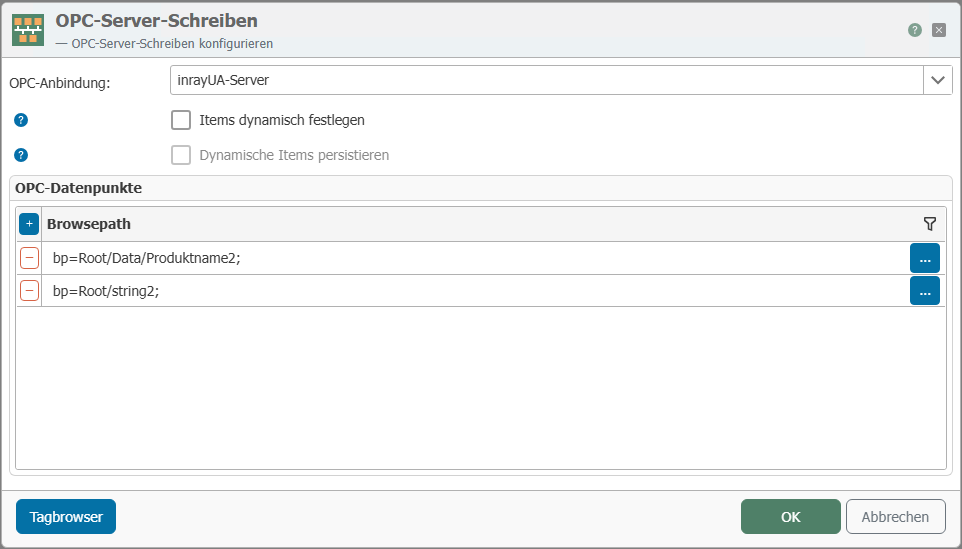
| Property | Description |
|---|---|
| Connection | Select the internal OPC UA server in which read-only OPC items are to be written or items are to be created and used at runtime. |
| Define items dynamically | Disabled, items in the grid below can be defined statically. Enabled, the TO expects two arrays to be passed to it at runtime. "Dynamic items" contains a list of the item addresses to be created/written and "Dynamic values" contains the corresponding values to be written in the order of the items. Click "..." to use the tag browser. |
| Persist dynamic items | If deactivated, the items are temporarily recreated at runtime as soon as they are written for the first time. If activated, OPC items created in this way are persisted in the future and are immediately available again even after service restarts without having to be recreated by the TO. |
| OPC data points | If you want to create OPC items statically ("Set items dynamically" deactivated), you can create the OPC items to be created/written here. For each item, the TO will provide an input through which the respective items can be written. |
| Tag browser | The tag browser is used to select elements to write to – these elements can also be read-only. It also provides an overview of the existing elements in the address space. Addresses of existing elements can also be used as templates for the static creation of new elements. |
note
Note: Persistently created items can be deleted using the "Discard Persistent Dynamic Data Points" function in the "Advanced" tab of the respective OPC UA server.