OPC Server Write TO
The OPC Server Write Transfer Object allows you to write to items stored as read-only in the OPC Router’s internal OPC UA servers. In addition, OPC items can be dynamically created and written to in the address space at runtime. Accordingly, the transfer object can be used to pass values to OPC items that were not configured in advance in the OPC UA server address space.
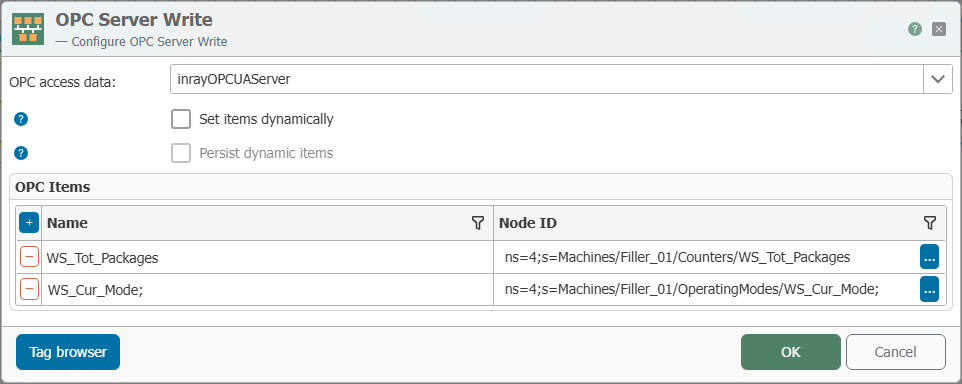
| Property | Description |
|---|---|
| Connection | Select the internal OPC UA server in which read-only OPC items are to be written or items are to be created and used at runtime. |
| Define Items Dynamically | Disabled: Specify the items to be written to statically in the grid below. Enabled: The TO expects two arrays at runtime. “Dynamic Items” contains the list of item addresses to be created or written to, and “Dynamic Values” contains the corresponding write values in the same order. Click “...” to use the tag browser. |
| Persist dynamic items | Disabled: Dynamically generated items are created temporarily at runtime as needed. Enabled: These items are stored persistently and are immediately available again even after a service restart, without having to be regenerated by the TO. |
| OPC data points | If “Set items dynamically” is disabled, use this section to statically define the OPC items to be created or written to. For each item, the TO provides an input through which the respective value can be written. |
| Tag Browser | The tag browser is used to select elements to which data is to be written—these elements may also be read-only. It also provides an overview of the existing elements in the address space. Addresses of existing elements can also be used as templates for the static creation of new elements. |
note
You can delete persistently created items using the “Discard Persisted Dynamic Data Points” function in the “Advanced” tab of the respective OPC UA server.