Change Gate Transfer Object
The Change Gate monitors one or more values and executes a subflow only if a value has changed in a relevant way. This means that downstream steps do not run in every cycle, but only when an actual change occurs. As with the Condition (IF) Transfer Object, the subflow is created as a separate process and is called when the gate is opened.
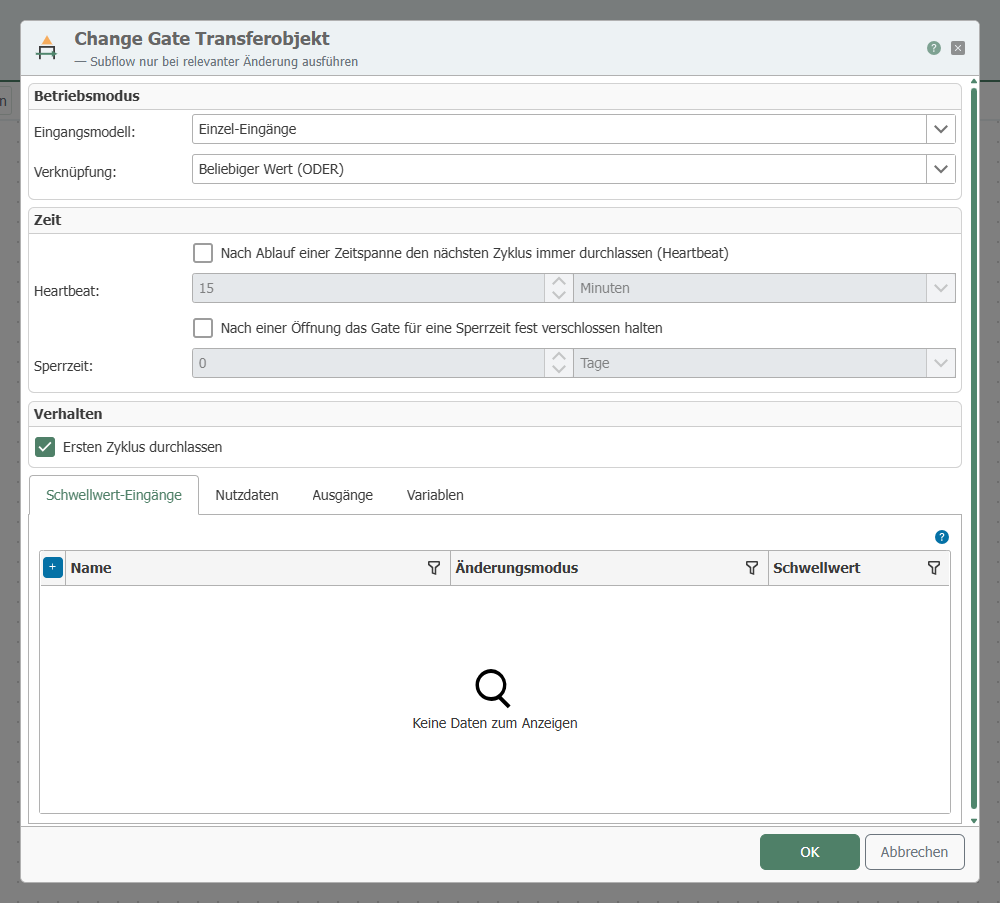
When editing the transfer object, configure the following properties:
Operating Mode
| Mode | Meaning |
|---|---|
| Individual Inputs | Fixed threshold inputs created in the dialog, each with its own change mode and threshold value. For values known at the time of configuration. |
| Key/Value Arrays | Two fixed inputs, Key and Value, each as an array. The arrays are linked in pairs via the index to form a set consisting of a key and a value. A common change mode and threshold value apply to all keys; the comparison basis is maintained for each key. For data-driven sets that are unknown at the time of configuration. |
Change Mode
Comparisons are always made against the most recently allowed value (the comparison baseline).
| Mode | The gate opens when ... |
|---|---|
| Any change | the value deviates from the comparison baseline. Identical values are blocked. |
| Absolute Threshold | the absolute deviation reaches the threshold value. |
| Percentage Threshold | the percentage deviation reaches the threshold value. |
The threshold modes require numeric values. In Single Inputs mode, the change mode is set individually for each input; in Key/Value Arrays mode, it is set once for all keys.
Logic
When there are multiple threshold inputs, the logic determines when the gate opens:
| Condition | The gate opens when ... |
|---|---|
| Any Value | At least one monitored value has changed significantly. |
| All Values | Every monitored value has changed significantly. |
Time
| Property | Meaning |
|---|---|
| Heartbeat | If the heartbeat is active, the next cycle always opens after the set time interval has elapsed, regardless of whether a change has occurred. The time interval is reset each time the gate opens. |
| Lockout Time | If the lockout time is active, the gate remains firmly closed for the set duration after opening, even if a change occurs or a heartbeat is received. The lockout time must be shorter than the heartbeat interval. |
| Catching up on blocked openings | If “Catch up” is active, the gate records the values received during the lockout time and processes them as a separate opening after the lockout time has elapsed (see below). This feature is only useful in conjunction with the lockout time. |
Recovering Blocked Openings
Without catch-up, all changes that occur during the lockout period are discarded. With catch-up enabled, the Change Gate records the last value observed for each monitored input or key during each cycle that occurs within the lockout period, and adds the recorded values as separate openings as soon as the next cycle arrives after the lockout period has flowed.

The following special considerations apply to catch-up:
- Items are flagged without a change condition: Even a value that does not reach the threshold value is flagged and backfilled. The change settings determine when the gate opens, not what may be flagged during a lockout period. In the diagram, V4, with a value of 11, is only 1 unit away from the comparison base but is transferred anyway.
- The catch-up process sets neither the comparison base nor a new blocking period. Subsequent cycles continue to be checked against the previous comparison base until one of them reaches the threshold value. In the diagram, the reference value therefore remains at 10 until V8; only V8 performs the transfer as usual, sets the reference value to 20, and starts the next blocking period.
- The catch-up open transfers the payload and scope variables of the cycle from which the cached value originates, not those of the triggering cycle. In Key/Value Array mode, the catch-up pairs may originate from multiple cycles; in which case the context of the last cycle that contributed to the lock time is transferred.
- The values of the triggering cycle are not lost: If they satisfy their change condition against the unchanged comparison basis, they follow in the same cycle as a second opening. The subflow is then called twice, first with the made-up opening; only the second, regular opening resets the comparison basis and starts the next lock period.
The timing of the transfer depends on when the next cycle arrives. If the blocking period expires without any data arriving, nothing happens initially; the stored value is transferred only with the next cycle.
Only the most recently received value is stored, not the most notable one. A brief extreme value within the lockout period is overwritten by a later value from the same lockout period.
What is backfilled: individual entries and key/value arrays
The same rule applies in both operating modes: A catch-up opening transfers whatever an opening in its operating mode always transfers.
- Individual Inputs: An opening always transfers all monitored inputs as a single data record. The entire cached data record is retrieved as soon as at least one monitored input deviates from its reference value—including inputs that have returned to their reference values. A cached data set whose values have all returned to their reference values is not retrieved, because an unchanged data set never reaches the subflow. Every deviation counts; the threshold value is irrelevant.
- Key/Value Arrays: An opening transfers individual pairs, and an unchanged pair never reaches the subflow. Therefore, only those flagged pairs whose value deviates from the reference value of their key are caught up; every deviation counts, and the threshold value is irrelevant. A value that returns to the reference value before the lockout period expires is not retrieved. If no marked pair deviates, the retrieval operation is omitted and the cycle is evaluated normally.
In Key/Value Array mode, the catch-up process is independent for each key: Keys that were blocked in different cycles of the same lock period are caught up together, each with its last observed value. A key that arrives for the first time during the lockout period follows the “Skip first cycle” option.
The Effect of Catching Up During Operation

Without catch-up, a gap occurs throughout the entire lockout period: The recording jumps from the last value before the lockout period directly to the next regularly transferred value. With catch-up, the value from the lockout period is transferred with a delay, but in its entirety.
Behavior
| Property | Meaning |
|---|---|
| Let First Cycle Through | If this option is set, the first received cycle opens the gate. Otherwise, the first cycle only sets the comparison basis without executing the subflow. |
| Align Array Payload | Only in Key/Value Arrays mode: Array payloads are reduced to the same array indices as the changed keys. |
If the gate remains closed, only the subflow is skipped. The transfer ends as a regular success; subsequent steps continue as normal.
Payload
In addition to the monitored values, additional inputs can be created as payload. They are not included in the change check but are passed to the subflow.
Variables
As with the other subflow transfer objects, scope variables can be declared. A variable with a static value is used as a fixed value; a variable without a static value is populated as a wired input for each call.
Subflow
The “Create/Open Subflow” button creates the subflow associated with the Change Gate and opens it in the Designer. Drag the desired transfer objects into this subflow. When the gate is opened, the monitored values (in Key/Value Array mode, only the changed pairs), as well as the payload data and variables, are passed to the subflow; its return values are available at the outputs of the Change Gate.