Subroutines
Starting with OPC Router 5.7, a flow can offload parts of its processing to sub-processes: small, independent flows that are not started by a trigger but by a transfer object from the calling flow. This allows flows to be executed conditionally (IF/THEN/ELSE), protected against errors (Try/Catch), executed only when values change (Change Gate), and reused from any number of flows once defined (function).
This page describes the common concept underlying all sub-process variants: what a sub-process is, how values are passed in and out, how sub-processes are published and executed at runtime, and what happens when they are copied, exported, or deleted. The properties of the individual transfer objects are listed on their respective detail pages.
Terms In the user interface, you will encounter the terms subflow, Subflow, and Sub-Flow to refer to the same concept. The reusable version is called Function (FX) in the toolbox; some buttons (e.g., Open FB) and settings still use the older term Function Block (FB)—they all refer to the same thing.
The Idea
A normal flow begins with a trigger and processes its transfer objects in sequence. A sub-flow is also a flow—but without a trigger. Instead, there is a transfer object in the calling flow, known as the caller. When the transfer from the main flow reaches the caller, the caller starts the subflow, passes values to it, waits for the result, and then continues processing with the return values.
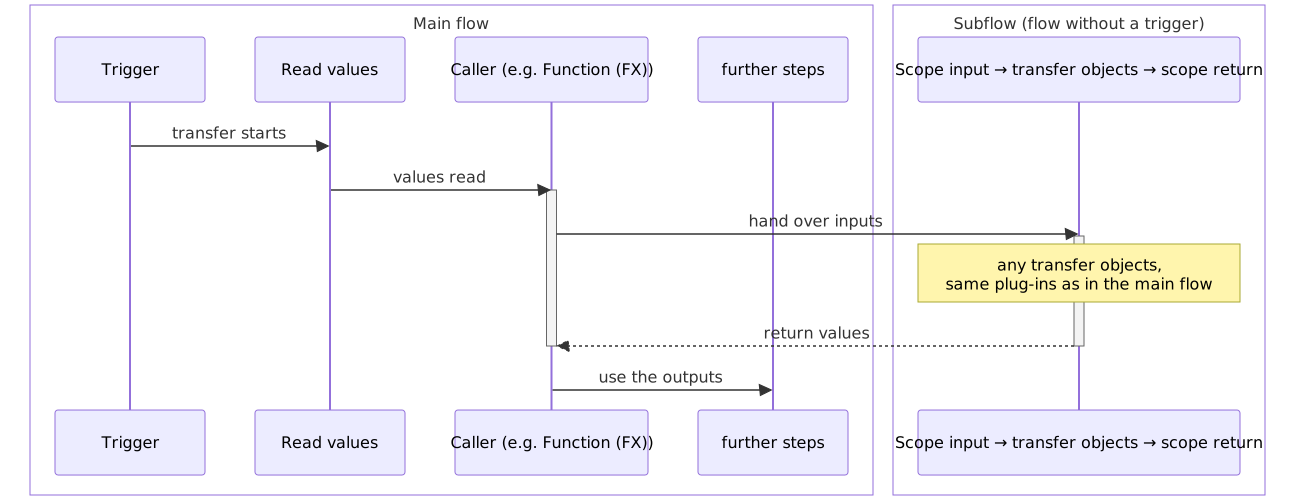
From the main flow’s perspective, the caller behaves like any other transfer object: It has inputs that you wire and outputs whose values you reuse. You design what happens in between in the sub-process—using the same transfer objects and plug-ins as usual. A sub-flow thus corresponds to a subprogram or function in programming: a self-contained processing unit with defined inputs and return values.
The callers
Four transfer objects from the Tools & ETL toolbox group call subprocesses. They follow the same principle but differ in when they execute the subprocess and how many subprocesses they have:
| Caller | Subprocesses | The subprocess runs when … | Typical use |
|---|---|---|---|
| Condition (IF) | THEN (required), ELSE (optional) | … the condition is true (THEN) or false (ELSE). | Branching: “Only if the temperature is above 80 °C, trigger an alarm.” |
| Error handling (Try/Catch) | TRY (required), CATCH (optional) | … always (TRY); if TRY ultimately fails, CATCH runs with the error information. | Safeguard: “Write to the database; if an error occurs, repeat up to three times, then use an alternative method.” |
| Change Gate | ON OPEN (a sub-process) | … at least one monitored value has changed significantly (the gate “opens”). | Offload: “Send data to the cloud only when there is an actual change in value, not in every cycle.” |
| Function (FX) | a reusable function | … the transfer reaches the call—always. | Reusability: “Use the same conversion in 20 flows, but maintain it only once.” |
Condition, Error Handling, and Change Gate have their sub-processes privately as branches; the function (FX) refers to a reusable definition (see Branches and Functions).
Structure of a Subprocess
Every subroutine consists of the same four components:
| Component | Location | Task |
|---|---|---|
| Caller | Transfer object in the calling flow | Decides whether and when the sub-process runs, passes the input values, waits for the result, and makes the return values available at its outputs. |
| Sub-Flow | Separate, hidden flow | Contains the actual processing. Is started exclusively by the caller. |
| Scope Input | First object in the sub-flow | Makes the input values passed by the caller available as output items in the sub-flow. From here, you wire the values to the transfer objects of the subroutine. |
| Scope Return | Last object in the subroutine | Collects the results at its input items and returns them to the caller. |
Scope Input and Scope Return are collectively called Scope Bridges. They are integral parts of every sub-flow: They are created automatically, are always visible—even without declared inputs or outputs—and cannot be deleted, copied, or pasted. The contract determines which items they carry.
What’s Different in a Sub-Flow
| Scope | Behavior in a sub-process |
|---|---|
| Trigger | Not allowed. Dropping a trigger from the toolbox or pasting one from the clipboard is rejected. |
| Manual Start | Not possible. Subflows do not appear in the flow list and cannot be put into production or started manually. |
| Flow Settings | Hidden. The calling flow determines the storage for status data, priority, flow timeout, trigger mapping, value conversion language, and store-and-forward. |
| Scope Bridges | Fixed. Cannot be deleted, copied, or pasted—not even via Undo/Redo. |
| Transfer Objects | Unrestricted. All transfer objects and plug-ins are available—including additional callers (nesting). |
Open Subflow in the Designer
An open sub-flow appears as a separate tab next to the main flow, with a colored highlight at the top. A notification banner above the diagram indicates which flow it belongs to:
- for a branch, the branch abbreviation (e.g., THEN, ELSE, TRY, CATCH) and Branch of with the name of the parent flow as a link—for a condition, additionally the condition expression;
- for a function, Reusable Function and, if opened from a call site, Called by with a link to the calling flow.
In the banner, enter a comment about the subflow. It appears as a tooltip on the caller’s Open button (e.g., Open THEN, Open TRY, Open Subflow, Open FB) and makes the purpose clear without having to open the subflow.
Branches and Functions
There are two types of subprocesses, which differ in terms of ownership, location, and lifecycle.
Branches (private)
The subprocesses for conditions, error handling, and change gates are called branches. A branch belongs to exactly one caller in exactly one flow.
- Branches are created and opened at the caller’s diagram node: The action bar displays, for example, Create THEN / Open THEN, Create TRY / Create CATCH, and for the Change Gate, Create Subflow / Open Subflow. Creating a branch establishes it with its scope bridges and immediately links it to the caller; opening it switches to a new tab.
- Branches do not appear anywhere as standalone flows—not in the flow tree, not in the template interface, not in the status tree, and not as separate entries in the publish tree. They can only be accessed through their caller.
- Branches follow their flow when renamed, moved, copied, exported, or deleted (see Copying, Exporting, Importing, and Deleting).
- The contract is declared at the caller and synchronized across all its branches: THEN and ELSE, or TRY and CATCH, share the same contract (CATCH additionally includes the reserved error inputs).
In the configuration storage, branches are located in hidden, system-managed folders with the extension .Scopes alongside their flow. Do not edit these folders manually. If branches and callers no longer match (e.g., after manually moving files), the caller’s editor displays this and offers Repair Branches or Delete Unreferenced Branches (at the Change Gate: Repair Subflow / Delete Unreferenced Subflows).
Functions (reusable)
A function (FX) is a sub-process without a fixed owner: It is created once as a function definition and can be used by any number of callers in any number of flows.
- Definitions are located in the Templates interface (“Templates & FBs,” cube icon) and can be organized into groups there just like templates.
- The contract belongs to the definition. Each call point adopts it unchanged; there are no separate items outside the contract at the call point.
- A definition that is still being used by call points cannot be deleted—nor can a template group that contains a definition currently in use.
- Functions may call other functions and may contain conditions, error handling, or change gates with their own branches. Circular references are not permitted (see Nesting).
Use a branch if the processing is needed only at this exact location. Use a function if the same processing is needed in multiple places or across multiple flows—this way, you maintain it in one place. Both forms can be freely combined: A function can be called within a branch and can itself contain branches.
Contract: Inputs and Outputs
The contract specifies which values enter and exit the subprocess:
- Inputs – Values passed by the caller. Each input appears as a wireable input item at the caller and as an output item at the scope input.
- Outputs – Values returned by the subroutine. Each output appears as an input item at the scope return and as an output item at the caller.
| Caller | Direction | Subroutine |
|---|---|---|
| Input “Temperature” | → | Scope input: Output item “Temperature” |
| Input “System” | → | Scope input: Output item “System” |
| Output “Enable” | ← | Scope return: Input item “Approval” |
Each contract element has a name that is unique within the contract and a data type: String, Boolean, Byte, Int16, Int32, Int64, Float, Double, DateTime—each of which can also be an array (e.g., Double Array). Passed values are converted to the contract data type upon invocation; values that cannot be converted cause the transfer to fail. Arrays are passed and returned as a whole.
How an input receives its value
- Wired Value – a value supplied via an arrow in the main flow always takes precedence.
- Fixed Value – a value entered directly at the caller (for the (FX) function in the Inputs tab; array values separated by commas, e.g.,
1, 2, 3). It applies as long as the input is not wired. - No Value – the input remains empty at runtime. The editor will warn you about this when saving.
How an output receives its value
- Return value – the value that the subroutine has returned via scope return.
- **Default value – the value stored by the caller for each output. It takes effect if the executed subroutine does not return a value for that output, and for all outputs if no subroutine was executed (condition false without ELSE, gate closed, TRY ultimately failed without CATCH).
- No value – If a subroutine ran and there is neither a return value nor a default value, the transfer fails with a corresponding message. If no subroutine was executed, the output remains empty.
Edit Contract
The contract can be edited in two places—in the caller’s editor (branches) or in the function dialog (functions) and directly at the scope bridges in the subprocess. Both methods affect the same model: A change to the scope input of a THEN branch appears on the condition transfer object and in the ELSE branch after saving; a change to the scope input of a function affects every call site.
When applied, the bridge items are regenerated. Existing wiring in the subflow is preserved as long as the names remain unchanged; a renamed or removed element disappears along with its wiring. Items that the caller provides automatically (e.g., the reserved error inputs of the CATCH branch) cannot be edited at the bridge.
Variables in subroutines
In addition to the contract, which passes values per call, subprocedures support scope variables. They function like template variables: A variable is declared with a name, data type, and default value, and is used as a placeholder {Name} in the properties of the sub-process’s transfer objects—for example, in an OPC path, a table name, a topic, or a formula.
The difference from a contract: A contract input provides a value that is wired via arrows. A variable replaces configuration text in places that cannot be wired.
In the “Log Value” subprocess, for example, the variable {Anlage} replaces configuration text in two places:
| Transfer object | Property | Entered value |
|---|---|---|
| Write to database | Table | Log_{Anlage} |
| Read OPC | Path | ns=2;s={Anlage}.Ist |
Declaration
Variables are declared at the owner—in the Variables tab of the condition, Try/Catch, or Change-Gate transfer object, or in the function dialog of the function. A variable created directly in the sub-process designer is also automatically carried over to the caller and sibling branches. The template variable types as well as plug-in connections are available as data types.
Assignment: static or hardwired
The caller assigns each variable in one of two ways:
| Assignment at the caller | Behavior |
|---|---|
| Value set (static) | Applies permanently to this call site and is inserted into the execution copy upon publication. No overhead is incurred at runtime. |
| Empty value (wired) | The variable is made available as a wired input item at the caller. The value is passed and inserted anew with each call. Without wiring, the variable’s default value is used. |
This allows the same sub-flow to be statically assigned to a system for each call site or dynamically populated with the system name from the trigger for each call.
Plug-in Connections as Variable Values
If a variable has a plug-in as its data type, it refers to a connection for that plug-in (e.g., a specific database connection). Specify the name of the connection as the value (case-insensitive); the internal ID is also accepted. This allows a subroutine to use a different connection for each call. An unknown connection results in a transfer error that specifies the name being sought.
Subroutines in Templates
Subroutines can be part of a template; {Name} may also be used within the branches and functions. When creating an instance, the dialog offers all variables used by the template, including its subroutines; upon publication, each instance receives its own execution copies with its variable values. If a name exists both as a scope variable in the caller and as a template variable, the following order of precedence applies upon publication: static value in the caller > value of the template instance > default value of the declaration.
Dynamic instances (instances generated from a database) do not receive execution copies of their subroutines upon publication. A conditional statement, try/catch block, change gate, or function call in a dynamic instance cannot be executed at runtime.
Nesting and Maximum Call Depth
Sub-processes may be nested: A branch can contain conditions, error handling, change gates, and function calls; a function can call other functions (e.g., FX → FX, IF → FX, or TRY → IF). The branches of a nested caller belong to the branch in which it is located and follow it just as branches follow their main flow.
Two safeguards prevent uncontrolled recursion:
- Circular references—where a subroutine calls itself directly or indirectly—are not permitted. They are detected during engineering (function selection, pasting from the clipboard; the message lists the reference chain) and rejected at runtime.
- The maximum call depth limits how deeply calls may be nested within one another. It is an expert setting in the Runtime options under Runtime in the section Maximum Call Depth for Subroutines (IF/FB) (default value:
16; visible only in expert mode). If this depth is exceeded, the caller reports an error instead of continuing to nest calls.
Publish
Subflows are never published directly. When publishing a flow, the OPC Router creates a separate, hidden execution copy for each use of a subflow—one per branch and one per function call (ten call sites for the same function result in ten copies). The caller’s static variable values are hard-coded; wired variables retain their placeholders because they are populated per call.
Because each usage has its own copy, a change to a branch or a function takes effect only when the calling flow is published next (phased rollout as with template instances). Flows that have not been republished continue to run with their previous copy; after a function change, the Publish tree marks all calling flows as changed. If an instance is removed, its copy is automatically removed from runtime upon the next publish.
The section “Publishing and Status” describes how execution copies are displayed in the publish tree and published along with their flow.
Execution at Runtime
Flow of a Call
When the transfer from the main flow reaches the caller, the following occurs:
- The caller decides whether a sub-flow is running (evaluate condition, check gate) and which one (THEN or ELSE, TRY or CATCH). If none are running, the default values of the outputs are applied and the transfer continues.
- The caller collects the input values (wired before fixed value) and converts them to the contract data types. Wired scope variables are inserted into the execution copy.
- The runtime copy is started: The scope input provides the values, and the sub-flow’s transfer objects are executed sequentially as in a normal flow.
- The scope return collects the results. The caller transfers them to its outputs; default values are used for missing values.
- The main flow continues. The call is part of the same transfer—the main flow waits until the subflow has finished (synchronous call).
The subflow runs in the same execution context as the main flow: one transfer, one worker thread for the entire nesting; the main flow’s settings also apply to its subflows.
One call per copy
At any given time, no more than one call runs per execution copy. A second call to the same copy—for example, because the same flow is running multiple times in parallel due to a fast trigger—waits until the first one has finished. In contrast, different call sites of the same function do not affect one another: They have their own copies and run independently of one another.
Timeout
Each call has a fixed time limit of 30 seconds. If this limit is exceeded, the caller reports an error (call status Timeout) and the sub-process is terminated before the next call is allowed to use the same copy. If a step in the subprocess does not respond to the termination, the OPC Router waits for a grace period of 5 seconds, then releases the copy and logs a warning.
In the case of nested calls, all levels share the time budget of the outermost caller: An inner call cannot take longer than the time remaining for the outer call. Long-running processing operations should therefore be placed in a separate flow, not in a sub-flow.
Error Handling
What an error in a subroutine means for the main flow depends on the caller:
| Caller | An error in the sub-process means … |
|---|---|
| Condition (IF) | The transfer of the main flow fails. The status details list the branch, the failed step, and the error message. |
| Error Handling (Try/Catch) | The TRY branch is repeated if necessary, after which CATCH runs. If CATCH has handled the error (or if there is no CATCH branch), the main flow remains successful. Only an error in the CATCH branch causes the transfer to fail. |
| Change Gate | The transfer of the main flow fails. |
| Function (FX) | The transfer of the main flow fails; the message specifies the function and the reason. |
Error handling (Try/Catch) is thus the means of catching errors from sub-processes—including function calls and conditions in the TRY branch—rather than allowing the entire flow to terminate.
Call status
Each call ends with a call status, which is displayed in the caller’s transfer details:
| Status | Meaning |
|---|---|
Ok | The subroutine was executed successfully. |
Skipped | No subroutine executed (condition false without ELSE, gate closed, unselected branch). No error. |
Failed | The subroutine ended with an error. |
Timeout | The timeout was exceeded; the subroutine was aborted. |
Rejected | The call was not accepted—for example, because the execution copy has not been published, the maximum call depth would be exceeded, or a circular reference was detected. |
ConnectionNotReady | The subroutine is not ready, e.g., because a required plug-in connection is disabled or has not yet been established. |
A flow is not considered ready until the plug-ins of its subflows are also ready. The expert setting Allow Execution if Subflow Plug-ins Are Not Ready in the main flow’s settings, you can disable this check for individual flows—for example, if a rarely executed ELSE branch uses a plug-in whose failure should not block the main flow.
Disabled and Unpublished Flows
An execution copy is active only when its calling flow is active; a deactivated flow also deactivates all its sub-flows. If a caller is executed whose copy has not yet been published (e.g., a newly added function before the next publish), the call ends with an error prompting you to publish the flow.
Status and Diagnostics
Subflows do not appear as separate entries in the status tree; instead, the calling flow displays a badge as soon as one of its subflows reports errors or terminations. The caller’s transfer details show the call status, executed branch, duration, return values, and error message; using the action bar of the caller node, you can open the subflow’s status diagram as an additional tab—even if it is nested. For details, see Publishing and Status.
Copy, Export, Import, and Delete
Because branches are private and functions are reusable, they behave differently when these actions are performed:
| Action | Branches (IF, Try/Catch, Change Gate) | Function (FX) |
|---|---|---|
| Copy/Paste Caller (Clipboard) | The copy receives no branches and never shares the original’s branches—create the branches anew. | The call site continues to reference the same definition. When pasting into another project, the definition is not copied along with it—use the file export feature for this. |
| Duplicate Flow | The branches are copied with their content and linked to the new flow. | The call sites continue to reference the same definition. |
| Rename / Move Flow | The branches follow the flow. | No effect on the definition. |
| Export Flow (File) | The branches are exported along with the flow. | The referenced definitions are exported along with the flow. |
| Import Flow | The branches are imported along with the flow and re-linked. | The definitions are imported along with the flow; call sites remain assigned. If the definition already exists, it is either overwritten or created as a renamed copy, depending on the import option, to which the imported call sites refer (see Export and Import). |
| Delete Caller | The branches are deleted. | The call site is deleted; the definition remains. |
| Delete Flow | The branches are completely deleted, including nested branches. | The definition remains. |
| Delete Definition | – | Only possible if no call sites refer to it anymore. |
| Create Template from Flow / Create Instance | The branches become part of the template; upon publication, each instance receives its own execution copies with their variable values. | Call sites continue to refer to the same definition. |
Any already published execution copies are not directly affected by any of these actions. The runtime does not apply changes until the next time the respective flow is published—including the cleanup of copies that are no longer in use.
Recommendations for Use
- Keep them small and named. Keep subprocesses manageable and use the comment in the header to give branches a descriptive purpose.
- Choose the contract carefully. Pass only what the subprocess actually needs. Configuration differences between call sites (system, table, connection) belong in scope variables, not in the contract.
- Static where possible. Static variable values are set at publication time and cost nothing at runtime. Only hard-code a variable if its value changes from one call to the next.
- Set default values if the main flow should continue to function properly even if the sub-flow is not executed (condition false, gate closed, TRY failed).
- Handle errors specifically. Place error-prone steps—database, web service, file access—in the TRY branch of an error-handling block and log
CatchErrorandCatchFailedTransferObjectin the CATCH branch. Enable retry only for steps that are harmless when executed multiple times. - Keep an eye on the timeout. A sub-flow must be completed within 30 seconds.
- Publish all callers after functional changes. The new version takes effect everywhere only after the affected flows have been published.
- No sub-processes in dynamic template instances. Dynamic instances do not receive execution copies.
Glossary
| Term | Meaning |
|---|---|
| Subflow (Subflow, Sub-Flow) | An independent flow without a trigger that is started exclusively by a caller. |
| Caller | A transfer object in the main flow that starts a subflow: Condition (IF), error handling (Try/Catch), Change Gate, function (FX). |
| Branch | Private subflow that belongs to exactly one caller (THEN, ELSE, TRY, CATCH, ON OPEN). |
| Function (FX), Function Block (FB) | Reusable sub-flow with its own definition in the template interface, callable from any number of flows. |
| Function Definition | The editable flow of a function, including its contract and variables. |
| Call Point | A function (FX) transfer object that uses a definition. |
| Contract | The declared inputs and outputs of a subflow, including their names and data types. |
| Scope Input, Scope Return (Scope Bridges) | Fixed transfer objects at the beginning and end of each sub-process that pass the contract values in and out, respectively. |
| Scope Variable | Placeholder {Name} in the properties of the sub-flow transfer objects, assigned statically (upon publication) or hard-coded (per call). |
| Runtime Copy | The hidden runtime instance of a sub-flow generated for each use during publishing. Only this instance is executed. |
| Call Status | Result of a call: Ok, Skipped, Failed, Timeout, Rejected, ConnectionNotReady. |
| Maximum Call Depth | An expert setting that limits the nesting depth of calls (16 by default). |