Error Handling (Try/Catch) transfer object
The "Error Handling (Try/Catch)" transfer object allows you to catch errors in a sub-process instead of letting the entire flow fail. The sub-flow to be protected is located in the TRY branch. If it fails, the call can be automatically repeated; after a final failure, the optional CATCH branch runs and receives the error information. Both branches are sub-flows that belong exclusively to this transfer object.
Typical use cases include accessing systems that are temporarily unavailable (databases, REST endpoints, PLCs), which should be retried after a short wait and, in the event of an error, logged or handled using default values.
Create the object within the flow as described and open the editor by double-clicking it.
Properties
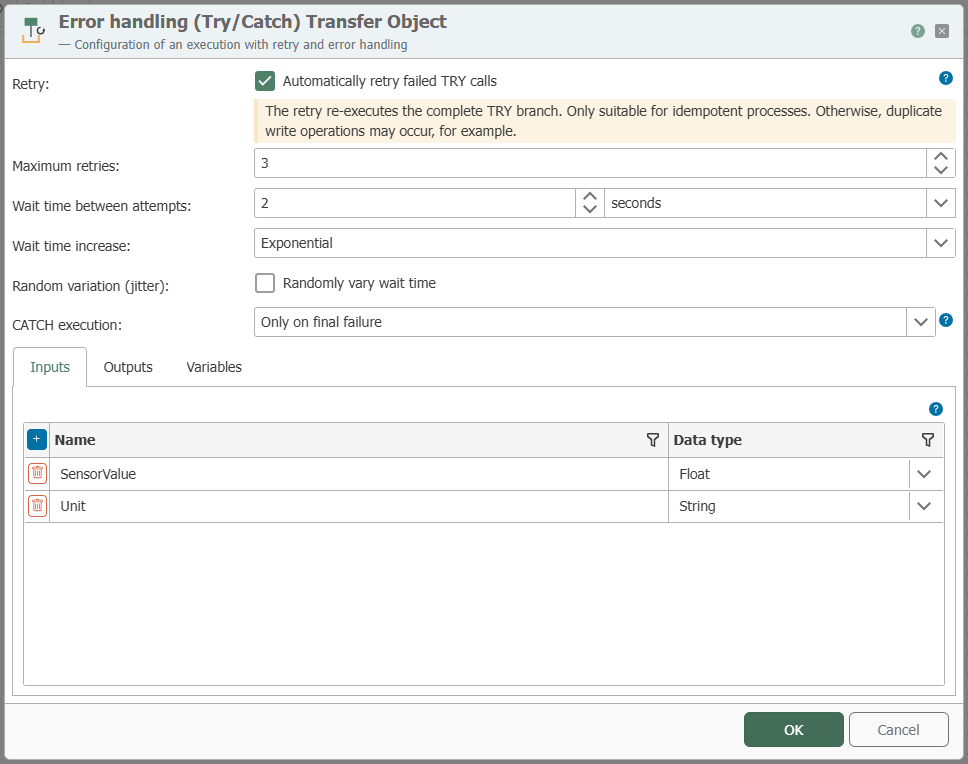
In the upper section of the editor, you configure the loop; below that, you define the structure of the branches in the Inputs, Outputs, and Variables tabs.
Retry
Retry is disabled by default. If it is enabled, a failed TRY call is repeated up to the specified number of times; the CATCH branch is executed only after the final failure.
| Property | Description |
|---|---|
| Retry | Enables automatic retries of failed TRY calls. The other retry properties are editable only if this is enabled. |
| Maximum Retry Attempts | Number of retry attempts in addition to the first attempt: 1 to 4, for a maximum of 5 attempts. Default: 3. |
| Wait time between attempts | Time interval between two attempts. Default: 1 second. |
| Increase in wait time | Constant: the set wait time before each repetition. Linear: The wait time increases by the set value with each repetition (1 s, 2 s, 3 s …). Exponential: The wait time doubles with each repetition (1 s, 2 s, 4 s …). |
| Random Jitter | Randomly varies each wait time so that multiple flows do not start their retries simultaneously and load the target system more evenly. |
| CATCH Execution | Only on final failure (default): The CATCH branch runs once after all attempts have failed. On every failed attempt: The CATCH branch runs after every failed attempt, e.g., to log each failed attempt; the input CatchAttempt specifies the triggering attempt. Without repetition, the CATCH branch always runs exactly once. |
A retry re-executes the entire TRY branch—including the steps that were already successful before the error occurred. Enable retries only for flows that can be executed multiple times (idempotent flows); otherwise, there is a risk of, for example, duplicate write operations.
"Inputs" tab
| Property | Description |
|---|---|
| Inputs | List of input values (name + data type). Each input appears as a wireable item on the object and is passed to both branches; there, it is available as the output of the scope input. |
The names of the inputs and outputs reserved for ""— (TryAttempt, CatchError, Succeeded …)—cannot be declared as separate inputs or outputs.
"Outputs" tab
| Property | Description |
|---|---|
| Outputs | List of return values (name + data type). Each output appears as an item on the object and receives its value from the scope return of the branch that delivered the result (TRY or CATCH). |
| Default Value | Optional value per output. It takes effect if the executed branch does not return a value—or for all outputs if the TRY branch fails definitively and no CATCH branch exists. If the executed branch does not return a value and no default value is specified, the transfer fails. |
Status Outputs
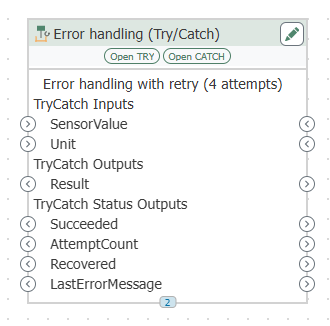
In addition to the declared outputs, the object has four fixed status outputs that allow subsequent transfer objects to react to the result:
| Output | Meaning |
|---|---|
Succeeded | Boolean value: true if the TRY branch was successful—possibly after multiple retries. |
AttemptCount | Number of TRY attempts executed. |
Recovered | Boolean value: true if the TRY branch ultimately failed and the CATCH branch handled the error. |
LastErrorMessage | Error message of the last failed TRY attempt; empty if the TRY branch was successful. |
"Variables" tab
Declaration of the scope variables for both branches (name, data type, default value) as well as their assignment: static value or hardwired input (an empty static value creates a hardwired “TryCatch Variable Inputs” item).
The variables are synchronized across both branches. Even a variable created directly in the branch designer is automatically copied to the transfer object and the other branch.
Branches
The branches are managed directly at the object’s diagram node: The action bar displays Create TRY or Open TRY (and similarly for CATCH). Creating a TRY block creates the sub-flow and immediately links it to the object; opening a TRY block switches to a new tab, while the current tab remains open.
| Branch | Description |
|---|---|
| TRY Branch | Required. Contains the flow to be protected and is called during every execution. |
| CATCH Branch | Optional. Runs after the TRY branch has failed definitively (or, depending on the CATCH implementation, after each failed attempt), e.g., to log the error, send a notification, or provide default values. If there is no CATCH branch, the failure is ignored and the default values for the outputs are applied. |
TRY and CATCH share the declared inputs and outputs. Any input or output that you create, rename, or delete directly in one branch at the scope input or scope return is carried over to the transfer object and the other branch.
Reserved Inputs and Outputs of the Branches
In addition to the declared inputs, the scope input of each branch automatically provides reserved inputs:
| Branch | Input | Meaning |
|---|---|---|
| TRY | TryAttempt | Number of the current attempt (1 = first call, 2 = first repetition, etc.). This allows the TRY branch to react differently during a repetition than it did during the first call. |
| CATCH | CatchError | Error message from the failed TRY attempt. |
| CATCH | CatchFailedStep | Step number of the transfer object in the TRY branch where the error occurred (number from the Designer). Empty if the error cannot be assigned to a transfer object, e.g., if a timeout occurred. |
| CATCH | CatchFailedTransferObject | Name of the transfer object that triggered the error (name of the plug-in instance used). Empty if the error cannot be assigned to a transfer object. |
| CATCH | CatchAttempt | The number of the failed TRY attempt that triggered this CATCH call. |
| CATCH | declared outputs | Each declared output is also available as an input in the CATCH branch and contains the value that the TRY branch had already returned up to the point of the error; if no value has been returned, it remains empty. |
In the scope input of the CATCH branch, these entries are kept in a separate, read-only list; they cannot be renamed or deleted there.
Repair Branches
If the editor detects problems with the branches (e.g., after external changes to the project files), it lists them in a note below the tabs and offers two actions: Repair Branches restores metadata, missing scope bridges, and variables for the referenced branches; Delete Unreferenced Branches removes branches that belong to this transfer object but are no longer referenced as a TRY or CATCH branch (visible only if such branches exist).
Runtime Behavior
| Situation | Behavior |
|---|---|
| TRY successful | The return values of the TRY branch are available at the outputs; Succeeded = true, Recovered = false. Any existing CATCH branch is marked as “Skipped.” |
| TRY failed, retry enabled | The TRY branch is called again after the wait time until an attempt succeeds or the maximum number of attempts is reached. AttemptCount specifies the number of attempts. |
| TRY failed permanently, CATCH present | The CATCH branch runs with the error context; its return values are available at the outputs. The transfer is successful; Succeeded = false, Recovered = true, LastErrorMessage contains the error. |
| TRY has failed permanently, no CATCH | The error is swallowed; the default values of the outputs are applied; outputs without a default value remain empty. The transfer is successful; Succeeded = false, Recovered = false. |
| Error in the CATCH branch | The flow transfer fails; the status details specify the branch and the point where the failure occurred. |
| Timeout | If a branch runs longer than the timeout of 30 seconds, the call is considered a failure—in the case of the TRY branch, this is treated as a failed attempt. CatchFailedStep and CatchFailedTransferObject remain empty in this case. |
An error handled by the CATCH branch or swallowed without a CATCH branch does not cause the flow to fail—the transfer remains green. Evaluate the status outputs if subsequent steps are to react to the error. When retry is enabled, the flow waits at this object until all attempts, including wait times, are complete.
’s “Publishing and Status” section () describes how individual attempts are displayed and opened in the status view.
Copying and Deleting
- If the transfer object is copied and pasted individually, the copy does not inherit any branches—it never shares the branches of the original.
- If the entire flow is copied, exported, or imported, the branches are moved along with it and are automatically relinked.
- If the flow is deleted, its branches are also deleted.