Text Replace Transfer Object
The “Text Replace” transfer object is used to pass text through flows in order to combine values and text.
After double-clicking the transfer object, configure the following properties:
| Property | Description |
|---|---|
| Output | Choose between SingleText and Array:
|
| Text | Enter your text here. You can insert placeholders by double-clicking the corresponding entry in the placeholder list to the right. |
| Placeholders | Use the plus sign here to add a new placeholder, or edit a selected placeholder using the corresponding button. You can remove a placeholder using the red cross. |
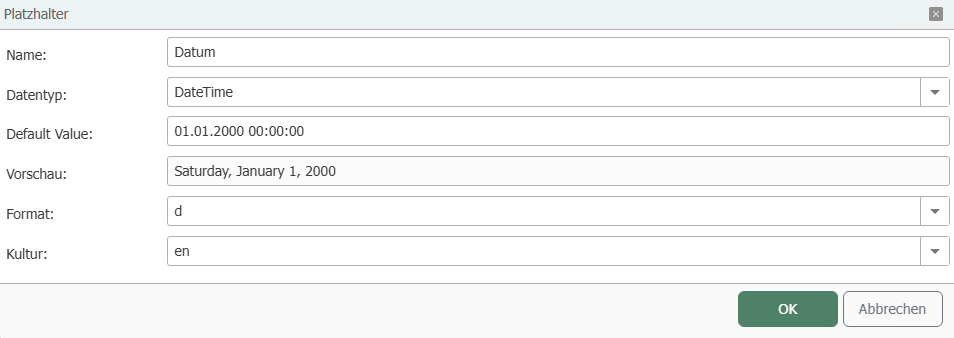
Define Placeholders
| Property | Description |
|---|---|
| Name | Assign a unique name to the placeholder. |
| Data Type | Specify the data type of the placeholder, e.g., String, DateTime. |
| Default Value | Enter a default value if needed. |
| Preview | The preview shows you how a value will be displayed. |
| Format | Select a format for the data types Int64, Float, or DateTime, |
| Culture | Select a culture to ensure the correct formatting. For example, commas or periods are placed differently depending on the selected culture. |
-1afb2a74e895d939d3127ba3c1c3a07d.png)