SAP IDoc Transfer Object
You use the SAP IDoc Transfer Object to send IDocs (Intermediate Documents) to an SAP® system. IDocs are available as both sources and destinations. The transfer object sends IDocs; IDocs are received via the IDoc Trigger.
Dialog Overview
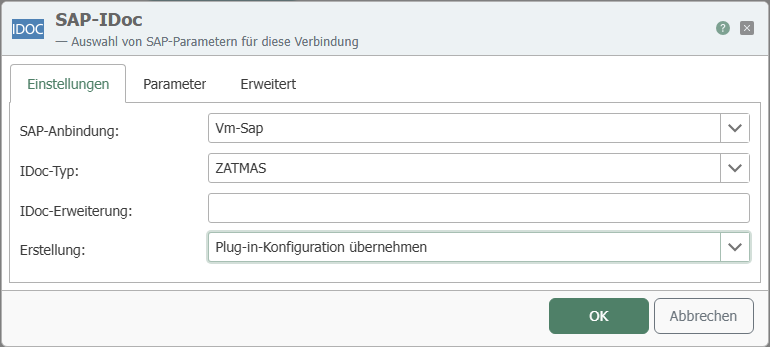
The screenshot shows the selection of the SAP® connection and the IDoc type, as well as the configuration of creation and parameters.
Settings
| Property | Description |
|---|---|
| SAP Connection | All SAP® connections created in the Plug-ins section are available for selection here. If the desired connection does not yet exist, you can make it available in the Plug-ins section as SAP® Connection . |
| IDoc Type | Selection of an IDoc type provided by the SAP® system. |
| IDoc Extension | Class extension of the base IDoc type (CIMTYP, customer-specific extension). |
| Creation Defines how the IDoc is structured: “Apply plug-in configuration” uses the setting selected in the SAP® plug-in at “IDoc handling”. “Create empty IDoc” sends the IDoc loaded from SAP®, but clears the existing elements and transfers only its own changes. “Use Template from SAP® System” adopts the default values from the IDoc segments stored in the SAP® system. |
Parameters
| Property | Description |
|---|---|
| Parameter Selection | Select the required data segments—that is, the elements to be read or written. |
You can write multiple data records to an IDoc at the same time; the required data segments are then created multiple times. Conversely, an IDoc can also deliver multiple data records.
note
IDocs that cannot be sent are temporarily stored in an IDoc queue.
Advanced
| Property | Description |
|---|---|
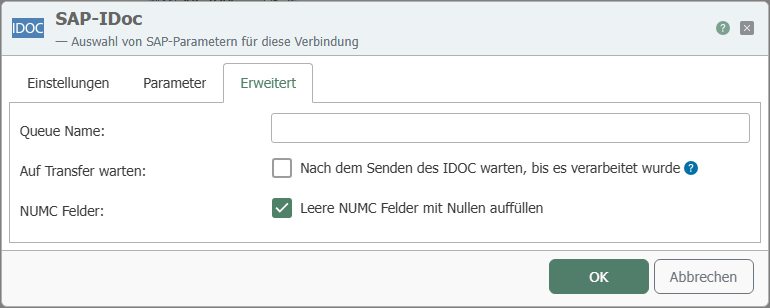
| Queue Name | Name of the IDoc queue where IDocs that cannot be sent are temporarily stored. |
| Wait for Transfer | If enabled, the transfer object waits after sending the IDoc until it has been processed in the SAP® system. |
| NUMC Fields | With the option “Fill empty NUMC fields with zeros”," empty numeric fields (type NUMC) are automatically padded with zeros. |