Status Storage Options
Diagnostic Storage for Flow Execution
Here, you can create new diagnostic storage areas for flow execution. These diagnostic storage areas store the values that are transferred within a flow. These values are displayed when you click on an item in a flow’s status chart.
Preconfigured Diagnostic Stores for Flow Execution
| Name | Description |
|---|---|
| Rollover 4GB (Default) | Stores a maximum of 4 GB of data; after that, older data is overwritten. |
| Max10Entries | Stores a maximum of values from the last 10 executions per flow. |
| 3 Days | Stores data for 3 days. Older data is deleted |
| Discard | No data is stored. "Discard" is a good option when there is no need to store the transmitted data. This helps save storage space. |
Overview of Diagnostic Logs for Flow Execution
The diagnostic logs are listed in a clear table.
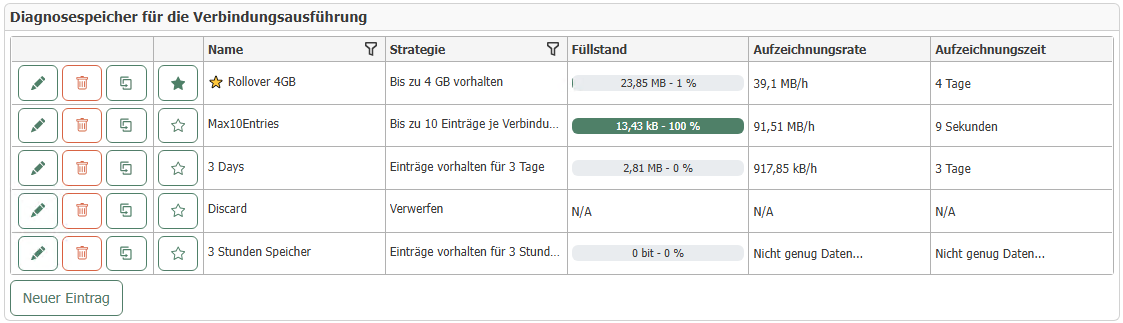
On the left side of each row, there are buttons for editing, deleting, and duplicating diagnostic records. Use the star button to set a diagnostic record as the default. To learn how these records can be used for flows, see: Settings for Flows and Templates.
Creating a Diagnostic Log for Flow Execution
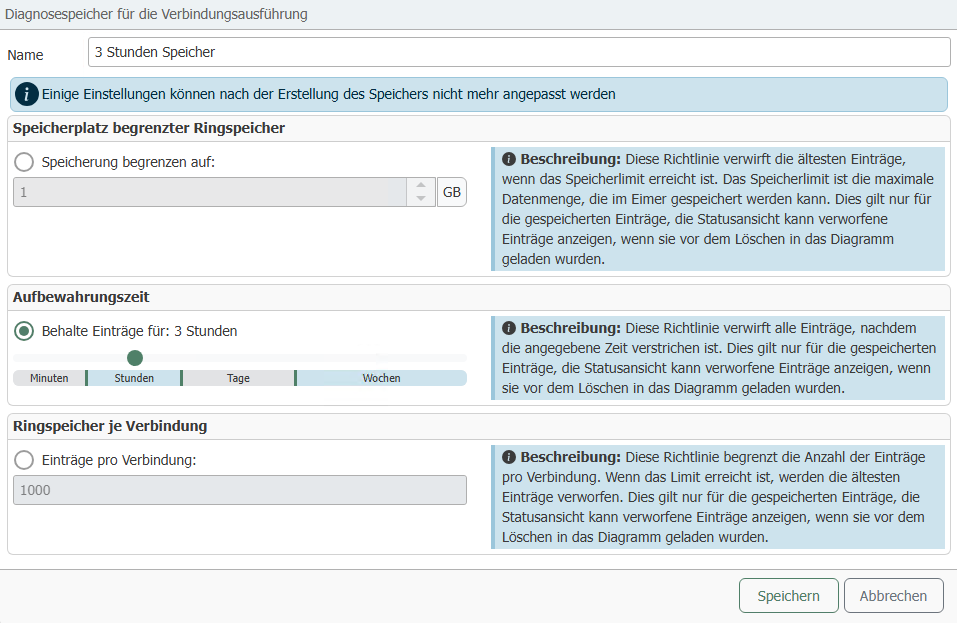
The following properties can be configured for a diagnostic storage:
| Property | Description |
|---|---|
| Name | The name for the diagnostic memory. It is used to identify the diagnostic memory during project configuration. |
| Type of Limit | Storage Capacity of Limited Ring Buffer: Here you can specify the amount of data that is stored before data is overwritten. |
With a space-limited ring buffer, the actual size on the storage medium may slightly exceed the specified limit, causing the fill level to be displayed as more than 100% in Web Management. This is because the limit refers to the payload data in MongoDB. The additional metadata generated is not taken into account.
After creation, the newly created storage is displayed in the overview.
Diagnostic Data Logging
Here you can clearly see what the current escalation level is.
For more information, see: Escalation Levels
-8a49401155785d5f8b5ea1d1847a5447.png)
The following options can be configured for diagnostic data logging
| Property | Description |
|---|---|
| Maximum database size | The maximum amount of data in GB to be stored. Used to calculate the escalation level. |
| Ring buffer size | The number of entries in the ring buffer. Default value: 2,000 entries. |
| Maximum number of characters in the status display | The maximum number of characters stored for a value in the status display. |
Transmission Execution Diagnostics
Here you can configure which diagnostic data from the transmission execution should be recorded and how much of it should be retained.
The following data can be recorded:
| Data | Description |
|---|---|
| Notifications | History of sent notifications. Default value: 512 MB. |
| Flow Status | The status of flows. E.g., “Ready” or “Plug-in Error”. |
| Plug-in Status | The status of the plug-ins. For example, “Ready” or “Error”. |
Runtime Service Diagnostics
Here you can configure which diagnostic data from the runtime service should be logged and how much of it should be retained.
The following data can be logged:
| Data | Description |
|---|---|
| Service Events | History of service events. Default value: 256 MB. |
| Service Status | Status history of the runtime service. Default value: 256 MB. |
| Service Health | Health of the runtime service. Default value: 256 MB. |
| Performance Metrics | Data on the OPC router's performance. Default value: 256 MB. |
If enough data is available, an estimated recording rate and duration are provided for the diagnostic data of the transmission execution and the runtime service. This might look like this, for example:

Approximately 112.65 kB of data is logged per hour here. This means that the data can be retained for about 13 weeks before it is overwritten.