Secrets
Secrets are the central repository for credentials in the OPC Router. Password fields in the configuration dialogs do not accept plain text but instead reference a secret—identified by the placeholder “Select a Secret…”. A changed secret thus takes effect everywhere it is used without having to modify the individual connections.
You can access the management interface via “Menu”, >, and “Secrets”. For each secret, the list displays the Store and the Key:
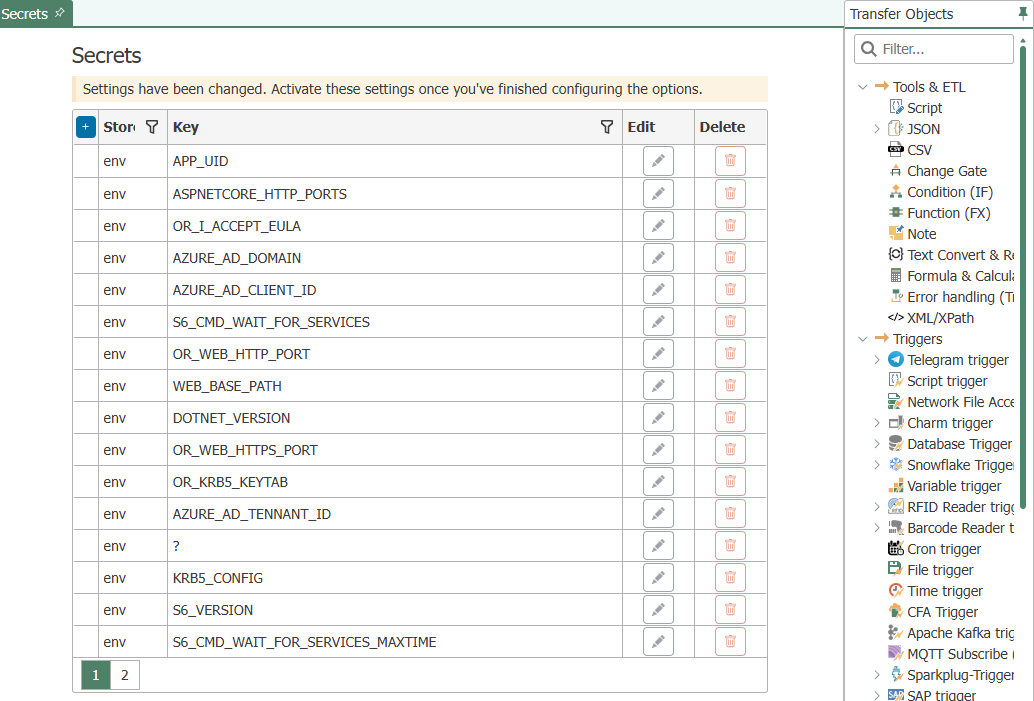
Stores
| Store | Content |
|---|---|
internal | Secrets created in the OPC Router |
env | The system or container environment variables—they are automatically available as secrets without their values being stored in the configuration |
The envstore is specifically designed for container operation: Credentials are passed to the container as environment variables and referenced by name in the engineering configuration. The variables recognized by the container are described at , and configurable environment variables are described at.
There are three special features of the env store:
- It is always read-only. Secrets cannot be created, modified, or deleted within it; the values are managed where the environment variables are set.
- It displays the environment variables of the running process as they were at startup. A variable that is subsequently changed on the system or in the container is not visible to the running OPC Router—the new value takes effect only after the services are restarted.
- Operating system variables are filtered out and do not appear in the list.
Create a secret
- Klikken Sie auf den Button “Hinzufügen” in der Liste. Der “Create secret” -Dialog öffnet sich.
- Wählen Sie “
Store,” geben Sie “Key” ein und hinterlegen Sie “Value”.” - Klikken Sie “Save”.”

Use a secret
In a configuration dialog, select the secret using its password field. The field stores a reference to the Key, not the value itself.
Change Secret
To change a secret, save it again under the same Key—this will overwrite the previous value. The configurations remain unchanged because they reference the Key and not the value itself. This allows you to change a password on a regular basis without having to open the individual connections. The OPC Router does not maintain a history of previous values.
Delete a secret
When deleting a secret, the OPC Router does not check whether the secret is still in use.
If a deleted secret is still referenced in configurations, this will result in runtime errors. Recreate the secret with the same Key to resolve the errors.
Storage and Encryption
The OPC Router stores secrets from the store internal encrypted and separate from the rest of the engineering configuration: in the configuration directory—by default C:\ProgramData\inray\OPC Router 5\config on Windows, /data/config in the container—and, when publishing to , additionally in the project database so that the runtime can read the values.
The file containing the internal secrets is removed from the diagnostic package that the OPC Router compiles for a support request. This ensures that secret values are not included in a support request.
Secrets and Versioning
The values of secrets are never part of a project version. Only the reference—the Key—in the configurations is versioned. Restoring an older version therefore does not change any secrets: The values remain as they were last stored. See Creating and Restoring Snapshots .
Secrets During Export and Import
When exporting a project, OPC Router writes the values of the secrets to the export file—but only the secrets that the project actually references.
Without a passphrase, the secret values appear in plain text in the export file. Assign a passphrase during export whenever the file leaves the computer, is shared, or is stored.
During import, the OPC Router creates the included secrets. If an imported secret has the same Key as an existing one, the imported Key is incremented (key_0, key_1, …); the existing secret remains unchanged. After such an import, check which Key the affected configurations are pointing to.