SAP RFC transfer object
SAP systems are available to you via RFC both as sources and as targets. The required SAP system must be configured as a plug-in instance. Create an SAP RFC transfer object within the connection as described.
The following properties can be configured:
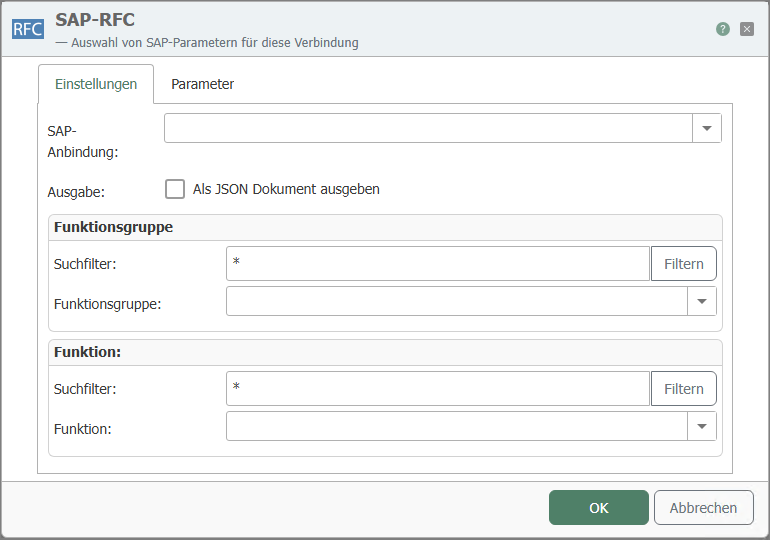 ### "Settings" tab
| Property | Description |
|---|---|
| SAP connection | The configured instances of the SAP plug-in are available here. |
| Output | Provides the results of the RFC call as a JSON document for further processing. |
| Function group | Selection of the function (module) group available on the SAP side. |
| Search filter | Enter a search term (* = placeholder) and click on "Filter", then ... |
| Selection | ... only the groups that match the criterion are displayed in the selection. |
| Function | Selection of the function module within the selected function group. |
| Search filter | Enter a search term (* = placeholder) and click on "Filter", then ... |
| Selection | ... only the modules that match the criterion are displayed in the selection. |
"Parameters" tab
| Property | Description |
|---|---|
| Available parameters | Select the required parameters by checking the corresponding boxes. You can also select entire categories. |
| Copy JSON format | Copies a JSON document to the clipboard whose structure corresponds to the function call. |
note
Note: If RFC functions are changed on the SAP system after they have been configured in the router, the router may need to be restarted to display these changes.
The parameters are categorized. They mean:
- Import: Data transfer to the SAP system
- Export: Data transfer from the SAP system
- Changing: Data transfer to the SAP system and return of the changed values.
These categories can contain further subcategories, e.g., "Table," which then contains the available tables.