Manage Schemas
Introduction
The JSON Schema Plug-In allows you to centrally manage JSON schemas in the OPC Router and use them in your connections. The plug-in enables you to formally define data structures and ensure that incoming and outgoing JSON data conform to a predefined schema. This reduces integration errors—for example, incoming JSON messages can be validated before processing, or outgoing JSON payloads can be created according to a fixed structure. The JSON Schema Plug-In is designed for use cases in IIoT and integration environments where JSON serves as the exchange format and a consistent data structure (such as according to the JSON Schema standard) must be ensured.
Schema Management
The JSON Schema Plug-In is configured via Schema Management. Here, you can either store schemas embedded within the OPC Router project or link a schema folder. In Schema Management, you also have the option to generate JSON schemas from existing JSON documents or to display sample data for a schema.
Embedded: In this mode, schema files are stored directly within the OPC Router project. You can add new schemas using the editor or import existing ones. Embedded schemas are included when the project is exported, making them available on other systems without the need for separate file exchange.
Linked Folder: In this mode, the plug-in references an external folder in the file system that contains JSON schema files. All .json and supported .yaml files in this folder (and any subfolders) are automatically loaded. Changes to the files take effect (after reloading or restarting) in the OPC Router project. This mode is useful when schemas are to be used by multiple projects or versioned externally. Note that when exporting a project, only the path—not the files themselves—is saved.
AsyncAPI/OpenAPI YAML Support: In addition to pure JSON Schema files, the JSON Schema plug-in can also load schema definitions in YAML format, such as those used in AsyncAPI or OpenAPI specifications. This means you can include an AsyncAPI or OpenAPI definition (.yaml/.yml); the plug-in extracts the JSON Schema structures (e.g., defined message payloads) from it and treats them like regular schemas. This makes it easier to reuse existing API definitions to validate incoming JSON messages or format outgoing messages accordingly.

Schema Management in the JSON Schema Plug-In: Choose between embedded schemas and a linked folder, with sample schemas loaded.
In the plug-in’s schema editor, you can edit schemas manually or use convenient features: Clicking “Create schema from JSON” automatically generates a schema suggestion from a sample JSON. Conversely, with “Show example JSON”, you can generate a valid JSON document based on the current schema—useful for illustrating or testing the structure. The editor supports the current draft versions of the JSON Schema standard (e.g., Draft 7 through Draft 2020-12) and validates the schema syntax, ensuring that errors are detected early during editing.
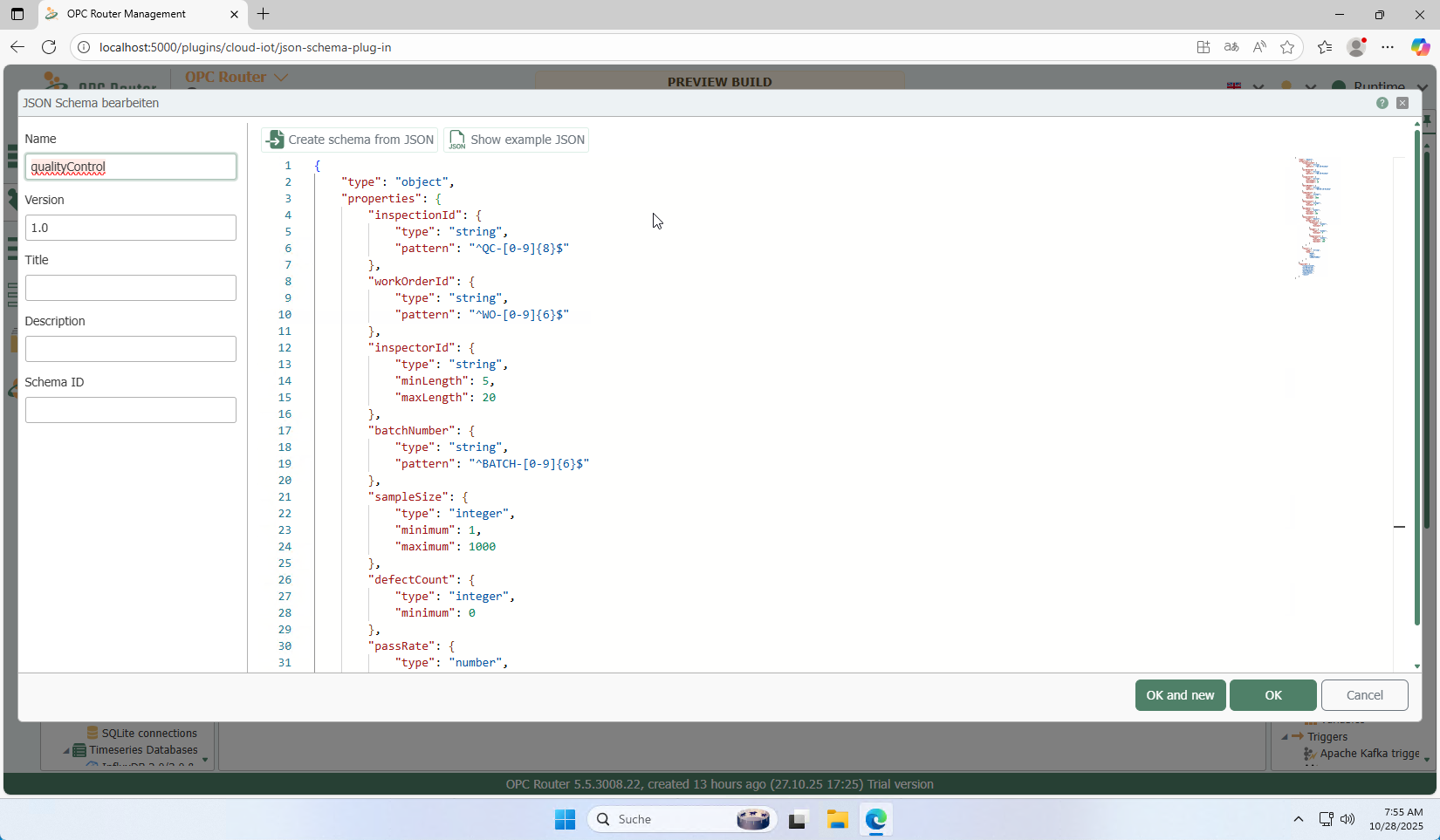
Editing a JSON schema: In the schema editor, you can assign names, import or generate schemas, and validate the structure in real time.
Use in Flows (Transfer Object)
The JSON Schema plug-in provides a transfer object that can be used to read, write, and validate structured JSON data based on a selected schema. The schema is selected from the schema management section. Either the latest version is used automatically, or a specific version is specified manually.
Internally, the transfer object uses JsonPointer to address individual fields within the JSON document. This allows values to be specifically read, written, or modified via a patch. For complex structures—such as arrays containing objects—the JsonPointer may need to be supplemented manually, as dynamic indexing is not supported.
Note: If a pointer points directly to an array or object, it is output in its entirety as a JSON string. Dynamic indexing with JsonPointer (e.g., [0], [i]) is not possible. Pointers may need to be set manually. Note that, depending on the schema and data context, these features may only be validated to a limited extent or in a simplified manner. For reliable results, complex constructs should be checked separately.
The transfer object can:
- Generate JSON data based on the schema
- Validate incoming JSON data
- In case of errors, either return a structured error list or abort the transfer
Optionally, a format culture can be set, which is used to convert between JSON Schema types and .NET data types.
Supported JSON Schema Features
| JSON Schema Feature | Supported |
|---|---|
type (object, array, ...) | ✔️ |
properties, required | ✔️ |
enum, const, default | ✔️ |
pattern, format | 🔶 (partially)¹ |
items (same schema) | ✔️ |
anyOf, oneOf, allOf | 🔶 (partially)² |
if / then / else | 🔶 (partially)² |
| Array of Values (String, Number, ...) | ✔️ |
| Array of Objects | 🔶 (partially)³ |
$ref local | ✔️ |
$ref external (HTTP) | ❌ |
patternProperties | ❌ |
Use manual pointers if necessary.
Notes:
¹
format: Only common formats such asdate-time,²
anyOf,oneOf,allOf, andif/then/else: Validation is simplified. Combinations with nested conditions or optional types may lead to unexpected behavior.³
Array of Object: JsonPointer cannot process dynamic addressing such asArrayProp/*/ItemProp. If necessary, use manual pointers with direct assignment such asArrayProp/0/ItemProp,ArrayProp/1/ItemProp, ...It is recommended to use
$refto define a separate schema for the object in the array and to project two individual transfer objects. The JSON is processed in two stages (e.g., the outer object generates the array structure, while the inner object processes the objects individually).
Example Schemas & Samples
The installation provides example schemas under Samples/, grouped into folders such as asset, event, measurement, production, and refs-demo. The latter demonstrate referencing between schemas using $ref. These templates are intended to assist with project design and simplify design testing. They are not meant to be production-ready examples, but rather to demonstrate what is fundamentally possible with JSON Schema in the OPC Router.
Example:
equipment.schema.jsonlocation.schema.jsonmachine_state_change.schema.jsontelemetry-packet.schema.json
In addition, “ready-to-use” specifications are included, such as:
- OPC UA WebAPI specification from the OPC Foundation
- Siemens Industrial Edge Common Payload Format
- Portainer REST API
These templates are intended to assist with project configuration. However, we assume no liability or warranty for their completeness or timeliness. We cannot guarantee that all functions of these specifications will be fully supported or correctly interpreted.
Best Practices
- Embedded schemas for portable projects
- Linked schemas for external version control (e.g., Git)
- Clear naming conventions (including version), e.g.,
order-v1.schema.json - Use of
$reffor reusability - Regularly test validity with sample data
Note / Disclaimer
Caution: JSON Schema is a dynamic, evolving standard. The OPC Router plug-in intentionally supports only a subset of it. Complex features such as
patternProperties, tuple arrays, or external$refreferences are not implemented.The included samples demonstrate which features are supported.