JSON Write Transfer Object
Using the JSON transfer object as a simple data exchange format, you can modify or create JSON-formatted text. Create a JSON transfer object within the flow as described. No plug-in configuration is required. You can configure the transfer object directly within the flow as described. The JSON expression is “JPATH.”
Here is an overview of the most important JPath syntax elements compared to the XPath elements:
| XPath | JSONPath | Description |
|---|---|---|
| / | $ | The root object/element |
| . | @ | Element in the current context |
| / | .or [] | Specification for child elements |
| // | .. | Recursive descent |
| * | * | Wildcard. Selects all objects/elements regardless of their name. |
| [] | [] | Subscript operator for element collections. |
| [] | ?() | To execute a filter (script) expression. |
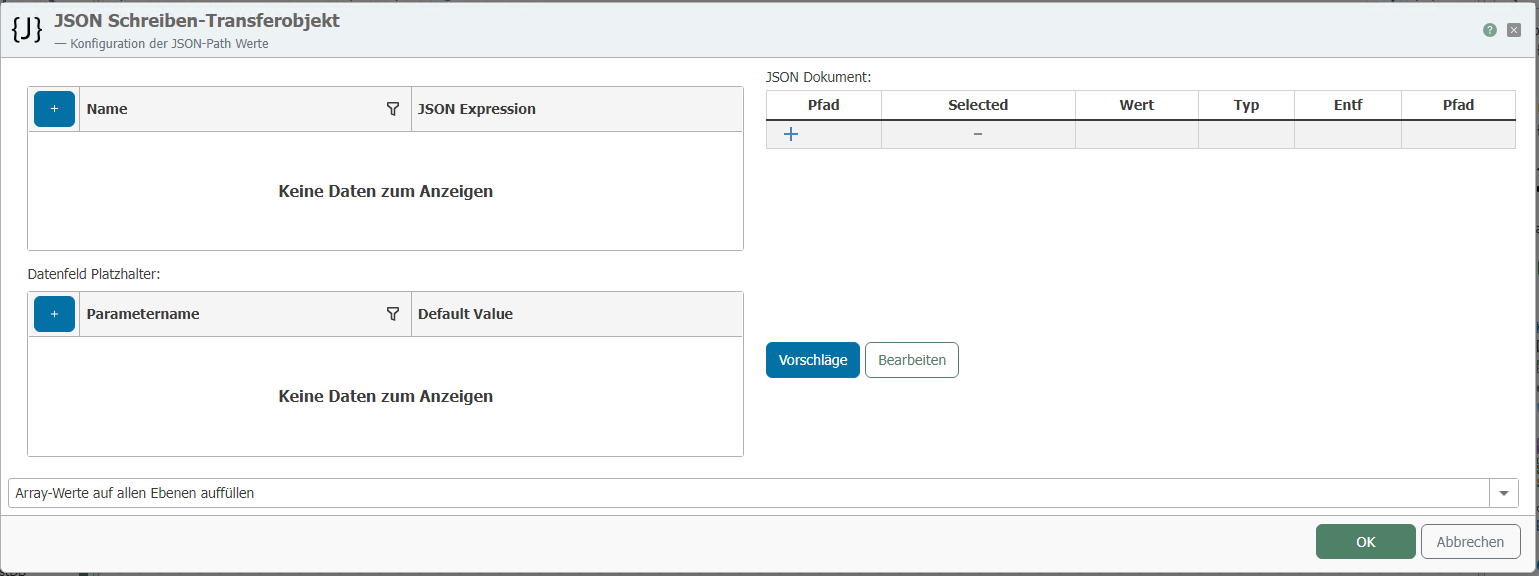
After double-clicking the transfer object, configure the following properties:
| Property | Description |
|---|---|
| Data Fields | Data fields can be imported from the defined JSON. The name is displayed on the transfer object as a parameter name, and the expression specifies where in the JSON the value should be written. At runtime, the data passed to the data fields is incorporated into the JSON document, or the value defined in the JSON is overwritten with the value of the data field. |
| Data Field Placeholders | Data field placeholders are used in expressions. They are specified within curly braces in the expressions, e.g.: |
| JSON | Specify the structure of the JSON document to be written here. Use the “Edit” button to enter the JSON syntax manually. Use the “Suggestions” button to analyze previously executed transfers of this flow, examine their JSON, and then adopt their syntax. |
| Fill in Values | Choose between the following modes:
|
A tree structure is defined in the JSON Tree editor as follows, for example:
{
"key":"value",
"some":[
{"name":"one","value":1},
{"name":"two","value":2},
{"name":"three","value":3}
]
}