Charm Trigger
The Charm Trigger initiates a data transfer when new data is available on the Charm device. Unlike OPC Router 3, which provided the transfer object and trigger separately, both functions are now combined in the Charm Trigger object—meaning the trigger also serves as the data source.
The individual properties are:
Confirm your entries by selecting “OK” (Confirm).
In addition to the message fields you selected from the available fields, further information about the received message is automatically displayed (message information). Under “Message Information,” the complete message, the IP address of the Charm device, the timestamp, and—in the case of multiple consecutive messages—a sequential numbering are displayed.
Message Information
| Property | Description |
|---|---|
| Complete Message | The complete message from the Charm device |
| Client Address | IP address of the Charm device |
| Message Index | If multiple messages are sent simultaneously, the OPC Router numbers the individual messages. |
| Timestamp | Timestamp of the message (UTC) |
In the Charm device, the IP address of the computer running the OPC Router must be specified along with the port number set here. The Charm device must send its data to this address. The OPC Router then performs the transfer of the data in individual records.
Fields of the predefined Charm device types
| Name | EZ | EZ-M | EZ-M2 | Description |
|---|---|---|---|---|
| Answer | X | X | Numerical test result including unit of measurement, where necessary | |
| Assay | X | X | Sample type | |
| ChannelNumber | X | X | X | EZ channel number |
| CommodityName | X | X | Raw material/Item | |
| controlLINE | X | X | X | Control Line Intensity |
| CurrentCommoditySelectIndex | X | |||
| CurrentDilutionSelectIndex | X | |||
| CurrentMatrixSelectIndex | X | |||
| CurrentTestSelectIndex | X | |||
| Date | X | X | X | Date of test |
| DE_Name | X | X | ||
| Dirt | X | X | X | Degree of lens contamination |
| FailCode | X | X | X | Error code if test fails |
| Flow | X | X | X | Flow value (Correct application of milk to the test strip) |
| Interpretation | X | X | X | Interpretation of the test result (positive, negative, etc.) |
| InterpString | X | (Interpretation in newer firmware) | ||
| LotNumber | X | X | LOT number (as entered on the device) | |
| MatrixNumber | X | Matrix number of the test result | ||
| Mode | X | X | X | Mode of the Charm device |
| OperatorID | X | X | Operator ID (as entered on the device) | |
| Ratio | X | X | Ratio of extraction solvent to extraction | |
| Remission | X | X | ||
| Result | X | X | X | Test result (positive, negative, invalid) |
| RFID | X | |||
| Sample ID | X | X | X | Test ID (as entered on the device) |
| StructVersion | X | X | X | |
| testLINE | X | X | X | Test Line Intensity |
| TestOutputName | X | X | X | |
| TestTemperature | X | X | X | Incubator-Temperature at the time of the test |
| TestType | X | |||
| Time | X | X | X | Time of the test |
| TipBlue | X | X | Displays value “Blue” when the test color has been identified | |
| TipGreen | X | X | Displays value “Green” if the test color has been identified | |
| TipRed | X | X | Displays value “Red”, if the test color has been identified | |
| UnitSN | X | X | X | |
| XLine | X | X | X | Intensity of the X line |
| YLine | X | X | X | Intensity of the Y line |
| ZLine | X | X | X | Intensity of the Z line |
Interaction with the Charm remote station
The section on sequence diagrams explains how to read this diagram.
The Charm device establishes the TCP connection itself and keeps it open throughout the entire transfer. For the three device types provided—EZ, EZ-M, and EZ-M 2—the response containing the parse result is enabled in the device definition; the OPC Router therefore acknowledges the data set at the end with exactly one character: 'Y' if the transfer ends with Ok, Pending, or Forwarded; otherwise, 'N'. If the device definition also includes a checksum field, this transfer acknowledgment is preceded by a second, independent acknowledgment over the same channel—it evaluates only the checksum and provides no information about the transfer itself. The following diagram shows both return paths as well as the branch for a message that is already erroneous upon receipt and is routed to the error trigger.
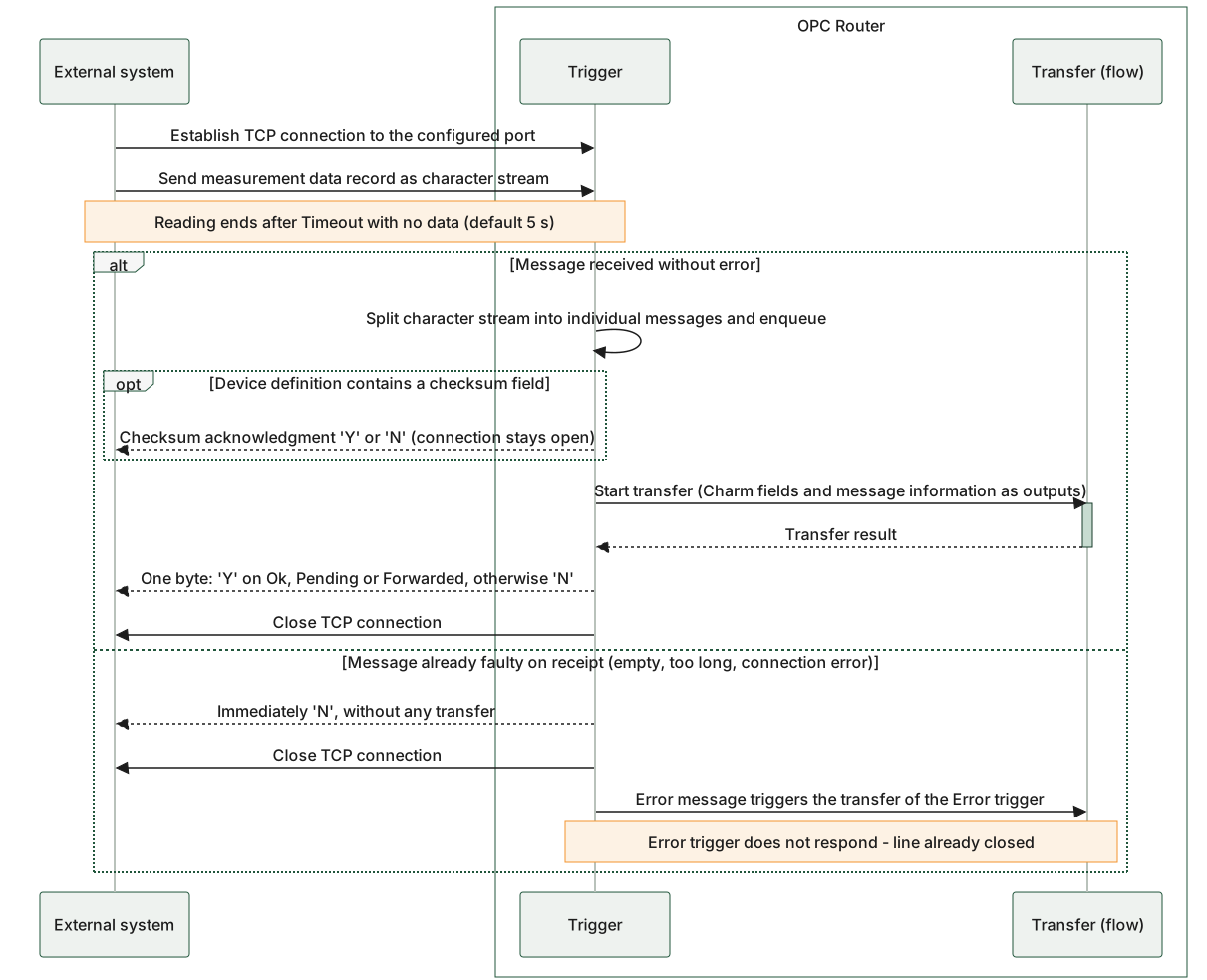
The diagram shows that the connection established by the Charm device remains open throughout the entire transfer, and only the transfer result determines which individual character is sent back. The character stream is read until nothing else arrives for the duration of the Timeout parameter, which is preset to 5 s. The checksum acknowledgment occurs visibly before the transfer and constitutes a separate, independent exchange over the same line. The branch illustrates the error scenario: In this case, the router immediately responds with “N” and closes the connection; the transfer of the error trigger then proceeds without a return path to the device because the line is already closed.
Charm Trigger: The connection to the Charm device remains open throughout the entire transfer; only the transfer result determines whether the response byte is “Y” or “N.”