OAuth 2.0 – Basics
This page explains the basics of OAuth 2.0 in the context of the OPC Router. It serves as a common reference and provides a centralized explanation of recurring terms and procedures. Information on which plug-ins retrieve the token themselves and which simply pass on a ready-made token can be found under “ configuration in the OPC Router” at .
OAuth 2.0 is a standard that allows an application to authenticate with a target system without sending a static password. Instead, it obtains a time-limited access token from a central authority and uses it to authenticate itself to the target system.
Roles
In the context of the OPC router, there are three roles involved:
| Role | Description | In the OPC Router |
|---|---|---|
| Client | Requests the token and uses it. | The OPC Router or the respective plug-in. |
| Authorization Server | Issues the access token after successful login. | The token endpoint of the identity provider (e.g., Microsoft Entra ID). |
| Resource Server | Verifies the token and returns the actual data. | The connected target system (e.g., REST API or mail server). |
Client Credentials Flow (Email plug-ins)
The Client Credentials Flow is the procedure for connections that do not require a user: The OPC Router logs in as a registered application without interactive authentication, since it runs unattended and without a browser at runtime.
In version 5.7, the Email Plug-in uses this method to obtain its token—for both sending emails and for the email trigger. Both also support the Device Code Flow, which additionally allows the trigger to log in with a username and password, as well as the Client Credentials Flow, optionally using a certificate instead of a secret.
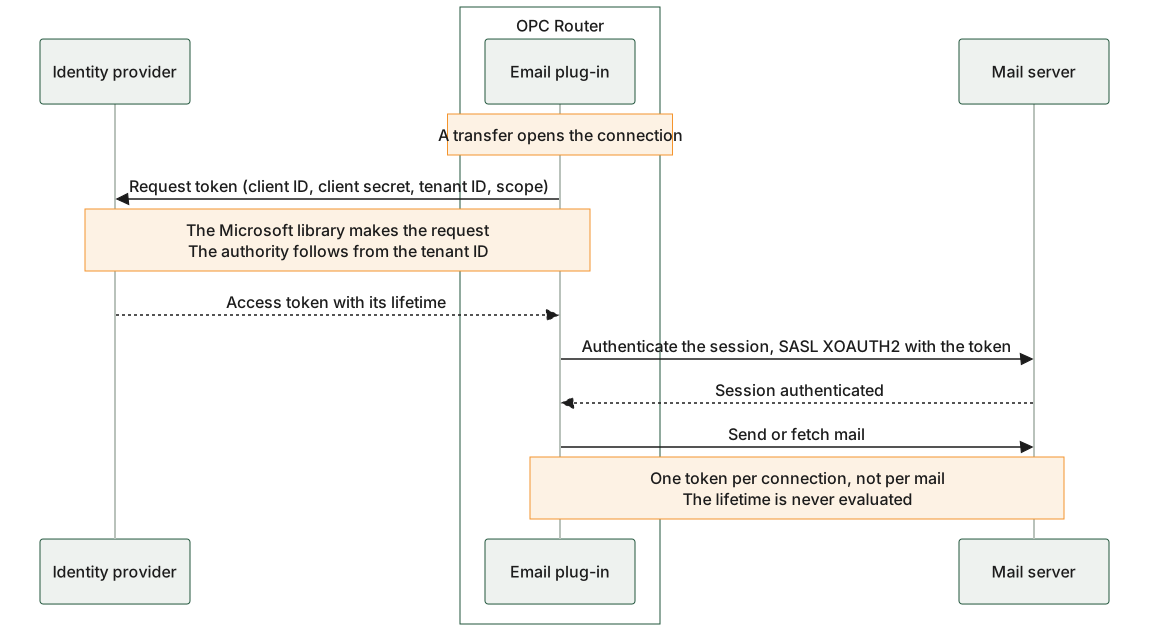
- The plug-in requests a token, authenticating itself with the client ID, client secret, and tenant ID (
grant_type=client_credentials). The Microsoft library handles the request; the endpoint address is determined by the tenant ID. - The authorization server responds with an access token and its expiration time.
- The plug-in uses the token to authenticate the session with the mail server—via the SASL XOAUTH2 method, not via an HTTP header. Emails are sent or retrieved only once the session is authenticated.
- A token is generated for each connection establishment—that is, for each transfer—and not for each email. The OPC Router does not evaluate the validity period; it does not renew a token prematurely.
Terminology
| Term | Meaning |
|---|---|
| Tenant ID | Unique identifier of the tenant (folder) at the identity provider. Assigns the login to the correct tenant; particularly relevant for Microsoft Entra ID. |
| Client ID | Unique application identifier of the registered client. Identifies the application to the authorization server. |
| Client Secret | Secret of the registered client for authentication at the token endpoint. In a plug-in with its own OAuth fields, store it there as a secret; for manually configured token retrieval, store it in a variable of type Secret String ( Secrets ). |
| Authority URI | Base address of the identity provider from which the specific endpoints (including the token endpoint) are derived. |
| Token URL | Specific endpoint where the access token is requested. |
| Redirect URI | Address to which the authorization server redirects after an interactive login. Relevant only for user-bound procedures; not for the Client Credentials Flow. |
| Scopes | List of requested permissions. They must match the client registration and the target system. |
| Access Token | Time-limited token that the application sends to the target system as proof. |
Logging in to Web Management (OpenID Connect)
Logging in to Web Management (the configuration interface) is an interactive process: A user logs in to the identity provider in their browser, for example, via single sign-on using Microsoft Entra ID (see Establishing the connection between Microsoft Entra ID/Azure AD ).
The OPC Router uses OpenID Connect for this and requests exactly one ID token that identifies the logged-in user. There is no authorization code, and no access token is issued: The ID token arrives directly at the redirect URI, sent by the browser as a form.
This procedure applies only to logging in to Web Management and has nothing to do with logging in to a plug-in connection. A plug-in connection retrieves its own token (Client Credentials) or has it assigned. The device code flow for email plug-ins is a third scenario: In this case, a user logs in once on any device, after which the connection runs unattended.
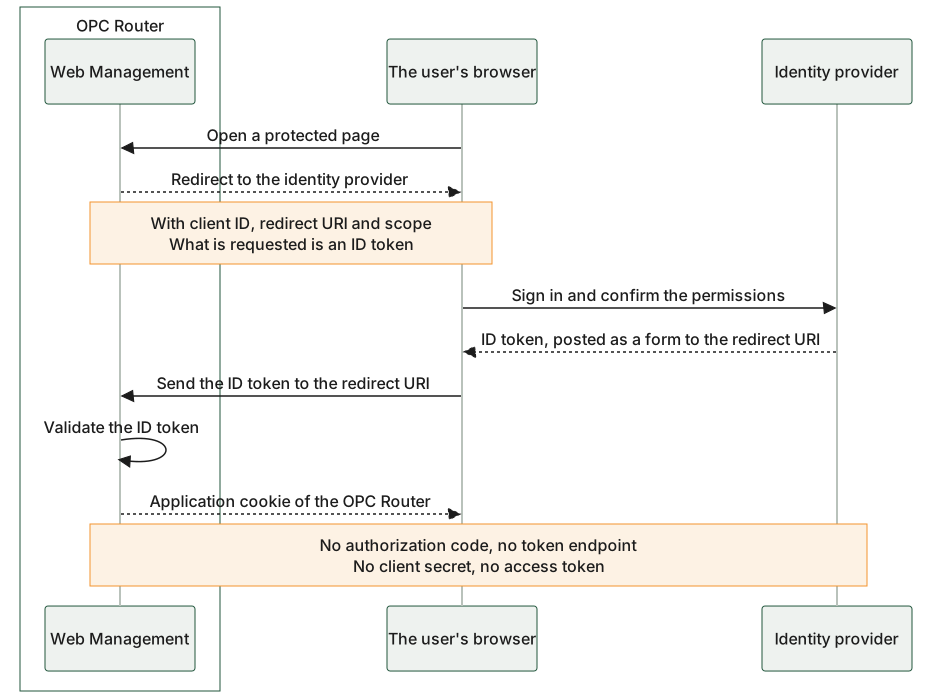
- When a user accesses a protected page, Web Management redirects their browser to the identity provider—providing the client ID, redirect URI, and scope, and specifying that an ID token is requested.
- The user logs in and confirms the requested permissions.
- The identity provider issues the ID token and sends it to the redirect URI; the browser transfers it as a form to Web Management.
- Web Management verifies the ID token and then issues its own application cookie. The remainder of the session runs via this cookie, without any further traffic to the identity provider.
For registration with the identity provider, this means: The application must be allowed to issue ID tokens, and a client secret is not required.
Differences from Basic Authentication
With Basic Authentication, the client sends the username and password (Base64-encoded) with every request. There is no token, no expiration time, and no fine-grained permissions.
OAuth 2.0, on the other hand, separates the login process (a one-time process at the token endpoint) from usage (an access token is required for every request). The token is time-limited and restricted to specific permissions via scopes. The password itself is not transferred to the target system.
Configuration in the OPC Router
Depending on the plug-in, OAuth 2.0 is provided in two ways:
- Natively configured: The plug-in has its own fields for the flow. In the email plug-in , enter the client ID, client secret, and tenant ID; the plug-in handles token retrieval. For the preconfigured Microsoft providers, the scopes are predefined; they can only be freely selected on the tab for the custom connection.
- Manually configured: The REST client does not perform OAuth authentication itself. If necessary, you retrieve the token via your own REST call and pass it on as a bearer token; the plug-in appends it to the call unchanged. A complete example can be found at Connection with Bearer Token .
Examples
Microsoft 365 / Entra ID
For Microsoft 365 or Entra ID environments, register an application in the Microsoft Entra Admin Center, where you will receive the tenant ID, client ID, and client secret. The token endpoint is in the format https://login.microsoftonline.com/<tenant-id>/oauth2/v2.0/token; a scope value ending in /.default is frequently used. The connection process is described at Connecting Microsoft Entra ID/Azure AD .
Generic OAuth Providers
The same terms apply for other providers. Refer to the documentation for the respective provider to find the token URL, client ID, client secret, and permitted scopes, and then enter them in the plug-in or use them in the REST call.