REST Client
The REST Client plug-in provides connectivity to an external REST interface. It defines the technical foundation for all REST calls that are later executed via the REST Client Transfer Object within a flow.
The mapping between the plugin configuration and the REST Client transfer object is described in the chapter REST in OPC Router: Structure and Responsibilities.
Dialog Overview
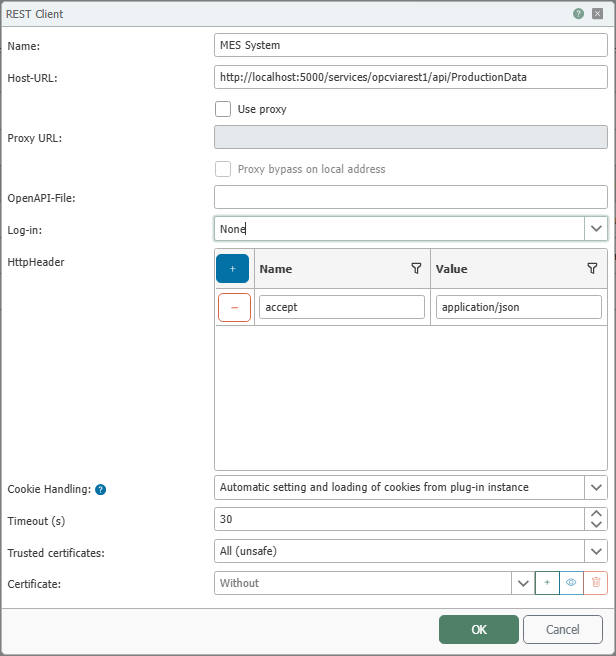
The screenshot shows the configuration of the general connection settings for an external RESTful web service, such as host address, proxy behavior, login, headers, cookie handling, certificates, and timeout.
Configuration
| Property | Description |
|---|---|
| Name | Any name under which the REST client appears in the flow configuration. Choose a name that uniquely describes the target application. |
| Host URL | Base address of the external RESTful web service. The endpoints used later in the transfer object refer to this address. |
| Use a Proxy | Enables the use of a proxy server for the connection to the RESTful web service. |
| Proxy URL | Address of the proxy server. This property is relevant when “Use proxy” is enabled. |
| Bypass Proxy for Local Addresses | Bypasses the proxy for local addresses. This property is relevant when “Use proxy” is enabled. |
| OpenAPI File | Path or address of an OpenAPI description file in JSON or YAML format. If an OpenAPI file is provided, the transfer object can more easily adopt endpoints and parameters. |
| Login | Specifies how the OPC Router logs in to the external RESTful web service. The available options and their use cases are described in the chapter “REST Client: Login Options.” |
| HttpHeader | Predefined HTTP header information that is sent along with requests to this connection. This allows you to specify, for example, fixed header values such as Accept or static authorization information. |
| Handling of Cookies | Specifies how cookies are handled for the plug-in instance. In the shown setting, cookies are automatically retrieved from responses and sent back with subsequent calls to the plug-in instance. |
| Timeout (s) | The time, in seconds, to wait for a connection to be established and a response to be received before an error is returned. |
| Trusted Certificates | Specifies which certificates are trusted for TLS-secured connections. For more information, see the section “Certificate Trust Model” and the chapter “Certificate Management.” |
| Certificate | Client certificate to be used for the connection. Click the plus sign to add a certificate, or the trash can icon to remove it. Click the eye icon to view the properties of the selected certificate. General information on importing and creating certificates can be found on the Certificate Management and Creating SSL Certificates pages. |
Depending on the selected login method, the dialog displays additional input fields for the respective login.
Login
Several login methods are available for the Login property.
An overview with descriptions and usage notes can be found in the chapter REST Client: Login Options.
Trust Model for Certificates
The following options are available for the “Trusted certificates” property:
| Option | Description |
|---|---|
| All (unsafe) | Any certificate is accepted. This setting is only suitable for testing and exceptional cases. |
| Router | Only certificates stored in the OPC Router’s certificate management and marked as trusted there are accepted. |
| Windows | Only certificates present in the Windows certificate store are accepted. |
For general information on importing and creating certificates, see the pages Certificate Management and Creating SSL Certificates.
Use in Flows
After creating the REST Client plug-in, use this connection in the REST Client Transfer Object to call a specific endpoint and process request and response data.