Read the most recent data record that has not yet been transferred
In the previous example, the current data record was retrieved cyclically from the table or the filter result. The following shows how the current data record is retrieved only if it is new—that is, if it has not been retrieved before. To do this, in addition to the timestamp column, you need a column that logs when a data transfer has taken place. This example includes an additional filter (ConfigID as the ID of the measurement series) as well as a filter on the Transfer column to select only records that have not yet been transferred. Just like the previous example, this flow could also be implemented as a template/instance. However, the simple version is shown here.
Required Fields/Columns:
| Name | Description |
|---|---|
| <zeitstempel> | Timestamp of type Date/Time, used for sorting |
| <transfer> | Column indicating whether a transfer has taken place (Type: Int, Default: 0) |
| ConfigID | ID of the measurement series |
| <werte> | Column(s) containing the relevant values |
Configure a DB transfer object with the following properties:
| Name | Configuration |
|---|---|
| Data Source | _<Ihre Datenbankanbindung aus dem Plug-ins-Bereich> _ |
| Type | Select |
Tab: General
| Name | Configuration |
|---|---|
| Table | _<Tabelle, die Ihre Daten enthält> _ |
| Columns | Move all required value columns from “Available” to “Used”. |
Tab: Filter
| Name | Configuration |
|---|---|
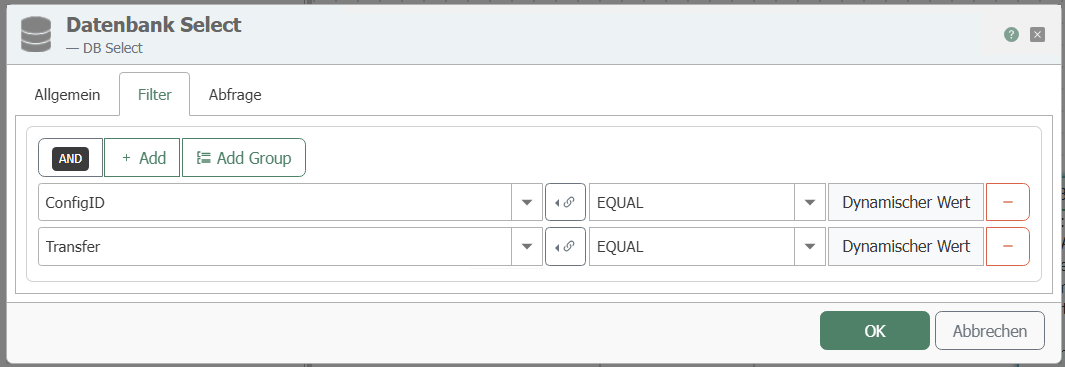
| Filter | “Add filter” creates a new filter. You need 2 filters. The AND operator is used by default. |
| Edit filter/filter group | Column: ConfigID Comparison operator: EQUAL Column: Transfer Comparison operator: EQUAL |
| Preview | This should now read: WHERE (ConfigID = ? AND Transfer = ?) |
Tab: Query
| Name | configuration |
|---|---|
| Sort order | Descending—this places the most recent record at the top. |
| Sort Column | <Zeitstempel-Spalte> |
| “Mark records after transfer” | Selected. Only with this option will the OPC Router reset the transfer flag in the source table. |
| Column to select | <Transfer> |
| Selection values | Not transferred: 0, Transferred: 1, Error during transfer: 2. The three values must be different. |
| “Limit number of records to” | Enabled, value 1 – only the topmost and therefore most recent data record is transferred. |
| “With empty SELECT” | “Abort transfer” – If no new data record is available, nothing is transferred and no error is triggered. |
For marking, the source table requires a simple primary key on the numeric column ID. All properties of the tab are described at DB transfer object .
This transfer object filters the data based on the ConfigID you enter and the transfer code. Enter “0” for the transfer code. Create a constant object with:
Required Constants
| Name | Description |
|---|---|
| <configid> | ID of the measurement series |
| 0 | for non-transferred data records |
Connect the ConfigID value to the ConfigID filter element and the 0 to the Transfer filter element:
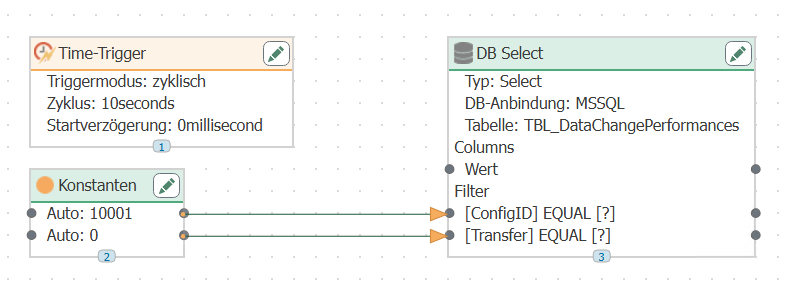
Configure a time trigger that polls the database cyclically.
After the transfer, the OPC Router writes “1” to the Transfer column; if a transfer error occurs, it writes “2.” With this engineering configuration, the latest data record in the measurement value series with Transfer = 0 is transferred each time.
Complete the flow
The data source has been configured up to this point. Three steps remain to make the flow operational:
- Set up the data destination connection. Use Item Links to connect the elements of the DB transfer object to the transfer object of your target system. For information on which target systems are available and the properties of their transfer objects, see the chapter for the respective plug-in: all plug-ins from A to Z.
- Go live. In the “” view, select “Publish”, select the changes, and click “Make changes productive”.” Until then, the runtime continues to operate using the most recently published version.
- Check the result. The “” status display shows whether the flow is running. In the Flow Status, you can see each individual transfer and the transferred values; the “Transfer” column in the source table will then show a value of 1.
If data arrives in the source table faster than the time trigger polls, it’s possible that the transferred record is already out of date or that records are skipped. Weigh the required accuracy against resource consumption on the database server. For database servers that offer a notification service, you can instead program a script trigger that triggers the transfer as soon as the database server notifies it. To ensure that no records are lost, you should read all untransferred records .