Read all records that have not yet been transferred
To retrieve all records from a table that have not been transferred, you need a column in which the OPC Router can mark a successful transfer. You execute a query with a filter on this transfer column.
Compared to the previous example ](read_new_current_value.md) in the “[,” the engineering differs in three ways: There is no filter on a measured value series, the number of transferred data records is not limited, and the sort order can be freely selected.
Required Fields/Columns:
| Name | Description |
|---|---|
| <transfer> | Column in which a successful transfer is indicated (Type: Int, Default value: 0) |
| <werte> | Column(s) containing the relevant values |
Configure a DB transfer object with the following properties:
| Name | Configuration |
|---|---|
| Data Source | _<Ihre Datenbankanbindung aus dem Plug-ins-Bereich> _ |
| Type | Select |
Tab: General
| Name | Configuration |
|---|---|
| Table | _<Tabelle, die Ihre Daten enthält> _ |
| Columns | Move all required value columns from “Available” to “Used”. |
Tab: Filter
| Name | Configuration |
|---|---|
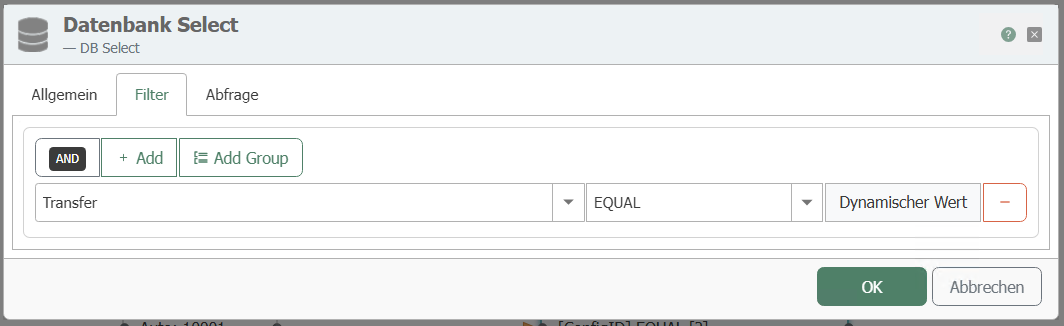
| Filter | “Add filter” creates a new filter. |
| Edit filter/filter group | Column: < Transfer> Comparison operator: EQUAL |
| Preview | This should now read: WHERE (Transfer = ?) |
Tab: Query
| Name | Configuration |
|---|---|
| Sort order | As required. |
| Sort column | As required. |
| “Mark records after transfer” | Selected. Only with this option does the OPC Router write the transfer flag back to the source table. |
| Column to flag | _<Transfer> _ |
| Flag values | Not transferred: 0, Transferred: 1, Error during transfer: 2. The three values must be different. |
| “Limit number of records to” | Disabled. All records with _<Transfer> _ = 0 should be transferred. |
| “With empty SELECT” | “Abort transfer” – If there are no records that have not been transferred, nothing is transferred and no error is triggered. |
For marking, the source table requires a simple primary key on the numeric column ID. All properties of the tab are described at DB transfer object .
On the first run, the flow transfers all records whose transfer column is set to 0—in other words, the entire legacy data set if the table is already populated. Set the legacy data to the selection value for transferred records (1) beforehand, or limit the number of records transferred for the first run.
This transfer object therefore filters the data based on the transfer code. Enter “0” for the transfer code. Create a constant object with:
Required Constants
| Name | Description |
|---|---|
| 0 | for non-transferred data records |
Make a connection between the 0 and the "Transfer" filter element:
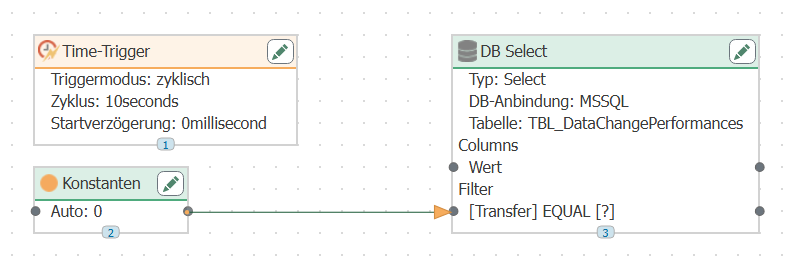
Configure a time trigger that cyclically queries the database.
After the transfer, the OPC Router writes “1” to the Transfer column; if a transfer error occurs, it writes “2.” With this configuration, the new data records with Transfer = 0 are transferred each time. Of course, you can perform additional engineering tasks, such as configuring the ID of the measured value series from the previous example .
Complete the flow
The data source has been configured up to this point. Three steps remain to make the flow operational:
- Connect the data destination. Use Item Links to connect the elements of the DB transfer object to the transfer object of your target system. For information on which target systems are available and the properties of their transfer objects, see the chapter for the respective plug-in: All plug-ins from A to Z.
- Go live. In the “” view, select “Publish”, choose the changes, and click “Make changes productive”.” Until then, the runtime continues to operate using the most recently published version.
- Check the result. The “” status display shows whether the flow is running. In the Flow Status, you can see each individual transfer and the transferred values; the “Transfer” column for the transferred records will then show a value of 1.