PostgreSQL Plug-in
Using the PostgreSQL plug-in, the OPC Router connects a PostgreSQL database to other systems and data sources. You can read, write, update, and delete data, as well as execute SQL queries and stored procedures. The connection can also be secured using SSL.
note
The PostgreSQL plug-in does not support user-defined data types or JSON as a data type.
The actual data transfer is implemented using the generic relational transfer objects and triggers. Filter expressions are described at database filter operators, and comprehensive examples can be found at examples and concepts.
Connection Settings
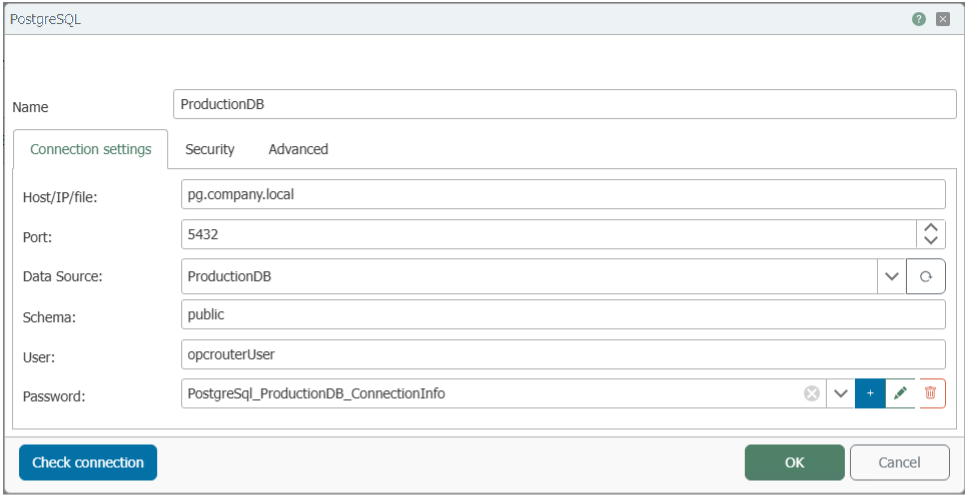
| Property | Description |
|---|---|
| Name | Any name under which this database server appears in the flow configuration. Choose a name that is unique to you during Flow configuration. |
| Host/IP/File | Server name or IP address of the PostgreSQL server to which the OPC Router should establish a connection. |
| Port | Network port for the database connection. For PostgreSQL, port 5432 is usually set by default. |
| Data Source | Name of the database that the OPC Router should use on this server. |
| Schema | PostgreSQL schema to be used. The default schema in PostgreSQL is public. |
| User | Username for logging in to the PostgreSQL server. |
| Password | Password for the specified user, stored as a secret. |
Security
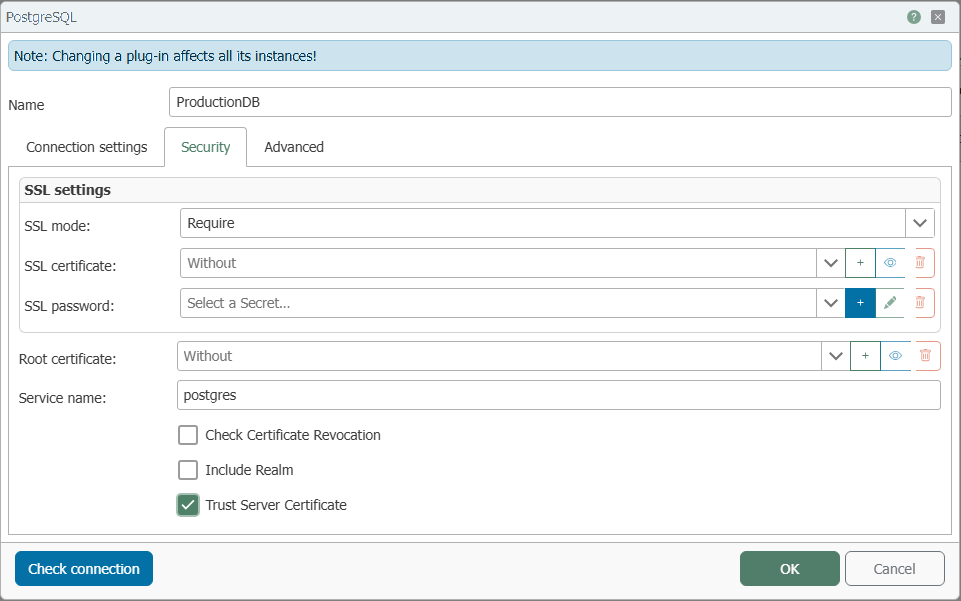
| Property | Description |
|---|---|
| SSL Mode | Specifies how the SSL connection is managed. An explanation of the options can be found here. |
| SSL Certificate | Select an SSL client certificate from the drop-down list that the OPC Router sends along with the connection. |
| SSL Password | Password for accessing the private key of the client certificate, which is sent to the server during the SSL handshake. |
| Root Certificate | Select a root certificate (CA) from the drop-down list that the OPC Router sends along with the connection. |
| Service Name | Kerberos service name of the PostgreSQL server. |
| Check Certificate Revocation | Enable if the certificate revocation list is to be checked during authentication (disabled by default). |
| Include Realm | Enable this if the Kerberos realm is to be used for authentication. |
| Trust Server Certificate | Enable this if the server certificate is to be trusted without validation. |
Advanced
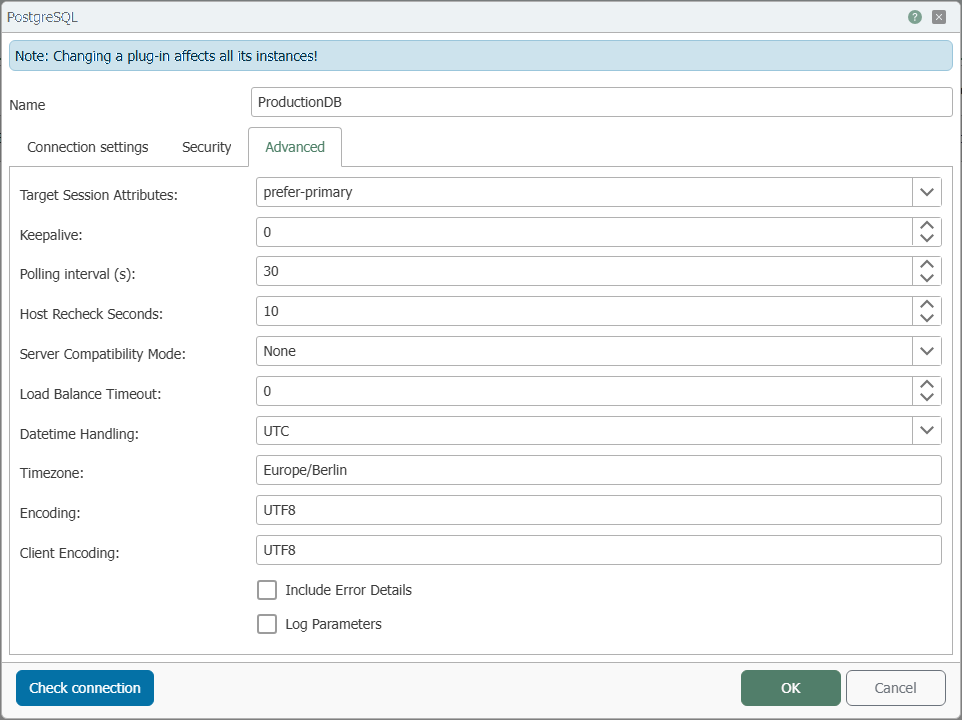
| Property | Description |
|---|---|
| Target Session Attributes | Specifies the preferred PostgreSQL target server type. |
| Keepalive | Interval in seconds during which consecutive keepalive packets are sent if no acknowledgment is received. |
| Polling Interval (s) | Interval in seconds during which the OPC Router periodically checks the database for changes. |
| Host Check Interval | Specifies how long the host's cache state is considered valid. |
| Server Compatibility Mode | Describes the server compatibility mode. None: No specific mode is active. NoTypeLoading: The server does not support the full loading of types from the PostgreSQL catalogs. Redshift: the server is an Amazon Redshift instance. |
| Load Balance Timeout | Maximum total connection lifetime (in seconds). Connections that exceed this value are terminated rather than returned to the pool. This is useful in cluster configurations to enforce load balancing between a running server and a server that has just come online. |
| Datetime Handling | Specifies how the OPC Router interprets timestamps when reading and writing. For an explanation of the options, see here . |
| Time Zone | Time zone of the PostgreSQL session in the Olson/IANA database format. |
| Encoding | Specifies the encoding for encoding/decoding PostgreSQL string data. |
| Client Encoding | Specifies the PostgreSQL character set used by the client. |
| Include error details | If this option is enabled, PostgreSQL error details are included. These may contain sensitive data. |
| Log Parameters | If this option is enabled, parameter values are logged when commands are executed. |
SSL Mode
SSL Mode determines how the SSL connection is managed.
- Disable: SSL is disabled. If the server requires SSL, the connection will fail.
- Allow: Prefers non-SSL connections if the server allows them, but also allows SSL connections.
- Prefer (default): Prefers SSL connections if the server allows them, but also allows connections without SSL.
- Require: The connection fails if the server does not support SSL.
- VerifyCA: The connection fails if the server does not support SSL. Also verifies the server certificate.
- VerifyFull: The connection fails if the server does not support SSL. Also verifies the server certificate against the hostname.
Datetime Handling
Specifies how the OPC Router handles timestamps. We recommend using UTC.
- Unspecified (default): The timestamp is accepted without additional conversion.
- Local: The timestamp is treated as the system’s local time.
- UTC: The timestamp is treated as or converted to UTC time. In many projects, this is the safest choice because UTC is independent of daylight saving time.