SAP HANA Plug-in
Using the SAP HANA plug-in, the OPC Router connects an SAP HANA database to other systems and data sources. You can read, write, update, and delete data, as well as execute SQL queries and stored procedures. The connection can also be secured using SSL.
The actual data transfer is implemented using the generic relational transfer objects and triggers . Filter expressions are described at database filter operators , and end-to-end examples are available at examples and concepts . The advanced connection parameters and parenthesizing behavior are the same for all relational database plug-ins and are described at Common Connection Settings .
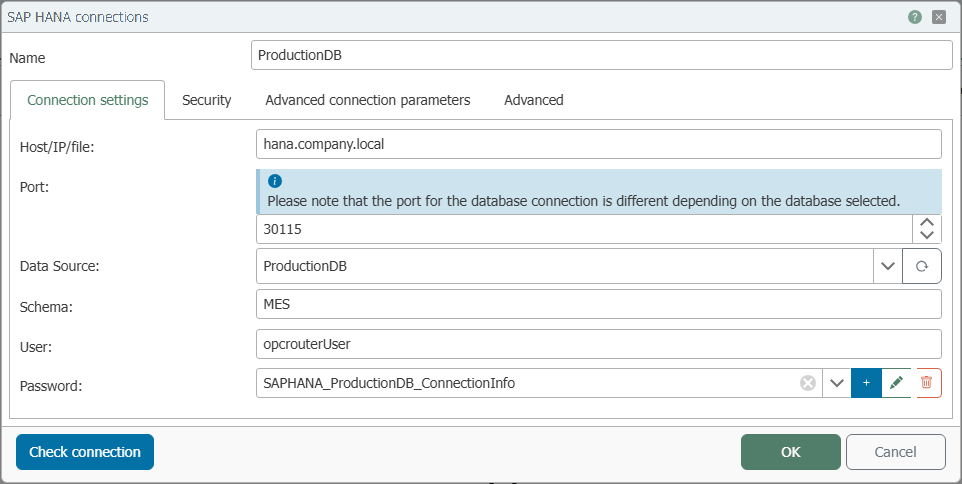
Connection Settings
| Property | Description |
|---|---|
| Name | Any name under which this database server appears in the flow configuration. Choose a name that is unique to you during flow configuration. |
| Host/IP/File | Server name or IP address of the SAP HANA server to which the OPC Router should establish a connection. |
| Port | Network port for the database connection. For SAP HANA, the port depends on the instance number and the selected database (schema 3<Instanznummer>15, e.g., 30015). |
| data source | Name of the database that the OPC Router should use on this server. |
| Schema | Database schema that the OPC Router should use. |
| User | Username for logging in to the SAP HANA server. |
| Password | Password for the specified user, stored as a secret. |
The port for the database connection varies depending on the selected database or instance.
Security
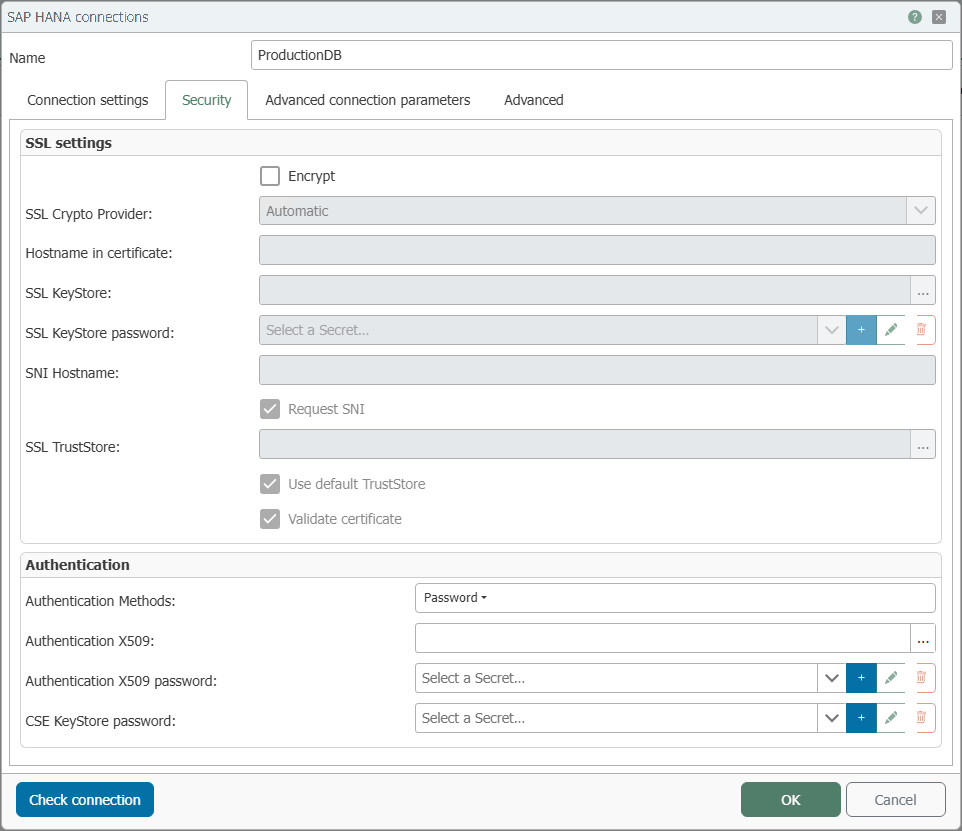
On the “Security” tab, you can configure transport encryption (SSL/TLS) and the authentication method.
SSL Settings
The SSL fields are only active if the “Encrypt” option is selected.
| Property | Description |
|---|---|
| Encrypt | Enables the encrypted (SSL/TLS) connection to the SAP HANA server. The other SSL fields are only active after this setting is enabled. |
| SSL Crypto Provider | Cryptography provider for the SSL connection (e.g., Automatic, OpenSSL, or commoncrypto). |
| Hostname in the certificate | Expected hostname in the server certificate, if it differs from the configured hostname. |
| SSL Keystore | Keystore containing the client certificate presented by the OPC Router. |
| SSL Keystore Password | Password for the keystore, stored as a secret. |
| SNI Hostname | Hostname for Server Name Indication (SNI) during the TLS handshake. |
| Request SNI | Requests Server Name Indication during the handshake. |
| SSL TrustStore | Trust store containing the trusted CA certificates used to verify the server certificate. |
| Use the default TrustStore | Uses the system's default TrustStore instead of a custom one. |
| Validate certificate | Verifies the server certificate against the TrustStore. |
Authentication
| Property | Description |
|---|---|
| Authentication Methods | Specifies the login method; by default, it is Password (username and password). For certificate-based login, you can select X.509. |
| X.509 Authentication | Certificate or keystore for X.509 authentication. |
| X.509 Password | Password for the X.509 certificate, stored as a secret. |
| CSE Keystore Password | Password for the Client-Side Encryption (CSE) keystore, stored as a secret. |