MySQL Plug-in
Using the MySQL plug-in, the OPC Router establishes a connection between a MySQL database and other systems and data sources. You can read, write, update, and delete data, as well as execute SQL queries and stored procedures.
The actual data transfer is implemented using the generic relational transfer objects and triggers . Filter expressions are described at database filter operators , and end-to-end examples are available at examples and concepts . The advanced connection parameters and parenthesizing behavior are the same for all relational database plug-ins and are described at Common Connection Settings .
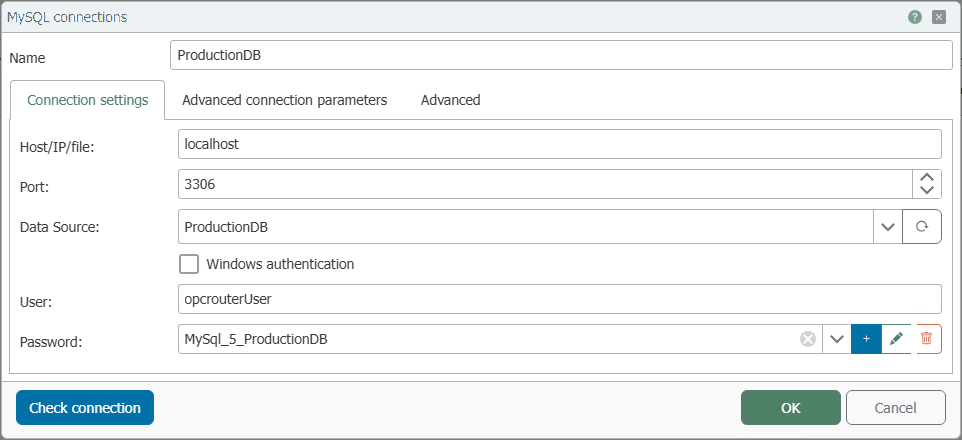
Connection Settings
| Property | Description |
|---|---|
| Name | Any name under which this database server appears in the flow configuration. Choose a name that is unique to you during Flow configuration. |
| Host/IP/File | Server name or IP address of the MySQL server to which the OPC Router should establish a connection. |
| Port | Network port for the database connection. For MySQL, the default port is usually 3306. |
| Data Source | Name of the database that the OPC Router should use on this server. |
| Windows Authentication | If this option is enabled, the OPC Router does not log in using the username and password from this screen, but rather using the Windows account of the OPC Router runtime service. This account must have the necessary permissions on the MySQL server and in the database. “Check connection” is of limited use here because it uses the configuration environment user rather than the Windows account of the runtime service. For more information, see Information on configuring Windows user accounts for the OPC Router . |
| User | Username for logging in to the MySQL server when Windows authentication is not used. |
| Password | Password for the specified user, stored as a secret. |